
The fastest way to restrict access to safety records is to combine role-based permissions with mandatory multi-factor authentication and an immutable, time-stamped audit trail, then default every new document to restricted sharing. Cut off anonymous links, automate revocation the day someone changes roles or leaves, and platforms like My Safety Solution can enforce most of this automatically instead of relying on manual settings changes.
TL;DR:
- Strict role definitions and site-scoped templates prevent supervisors from accessing safety data outside their specific crews or projects.
- Multi-factor authentication is mandatory for privileged accounts, blocking access from unmanaged devices and unexpected locations, with anonymous links disabled.
- Audit trails must log detailed user actions, including before and after values, with hash-chaining for tamper evidence; regular reviews detect unauthorized changes early.
- Automating onboarding and offboarding cuts permission creep, with quarterly reviews ensuring permissions stay aligned with current roles.
- Implementing default record restrictions, infection-proof audit logs, and expiring links forms the core of a compliant and secure safety record management system.
Table of Contents
- How Do You Restrict Access to Safety Records by Role?
- What Technical Controls Stop Unauthorized Access?
- What Makes an Audit Trail Actually Defensible?
- How Do You Prevent Permission Creep After Hiring and Offboarding?
- How Long Should You Keep Safety Records, and How Should They Be Protected?
- What Should a Quick Implementation Checklist Include?
- A Practitioner’s View on Balancing Security and Speed in the Field
- How My Safety Solution Handles Access Control for You
- Where These Access Control Standards Come From
- Sources
- FAQ
How Do You Restrict Access to Safety Records by Role?
Access control fails most often not because a company lacks rules, but because nobody defined the roles clearly in the first place. A supervisor who can edit training records for the whole company, when they only manage one crew, isn’t a convenience. It’s a liability waiting for the wrong click.
The fix starts with a role-mapping workshop. Bring safety, operations, HR, and IT into one room and define who actually needs to see what. Most high-risk employers land on five practical tiers: Admin, Safety Manager, Supervisor, Recorder, and Worker. Each tier gets a defined boundary, not a vague label.
- Admin: full system configuration, user provisioning, and company-wide reporting
- Safety manager: edit and export rights across all sites under their division
- Supervisor: view and edit rights limited to their own crew or project
- Recorder: can log attendance and complete tailgate talks, but can’t alter historical entries
- Worker: view-only access to their own attendance and training history
Site-scoped or project-scoped role templates keep a supervisor in Phoenix from ever seeing payroll-linked safety data for a crew in Ohio. That scoping matters more in construction and utilities than almost any other sector, since crews rotate between sites constantly and access needs to rotate with them.
Pro Tip: Document your role templates once, then reuse them for every new project instead of rebuilding permissions from scratch. Consistency during onboarding is what actually prevents access creep.
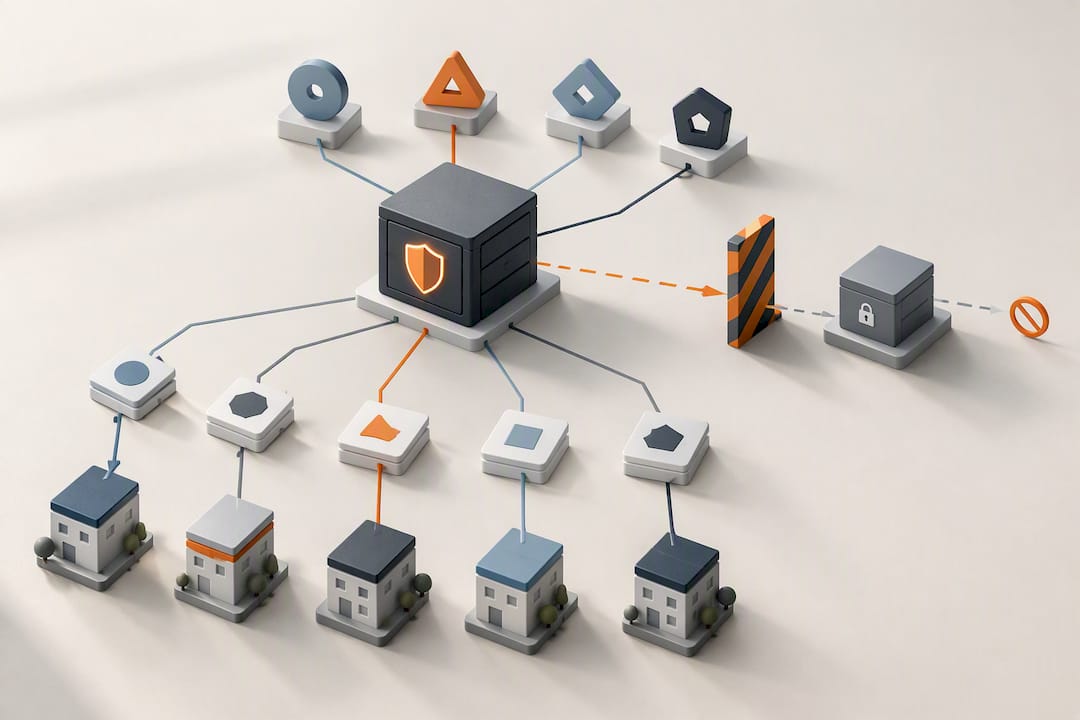
What Technical Controls Stop Unauthorized Access?
Role definitions only work if the login itself is trustworthy. Weak passwords and shared logins are still the most common way outsiders get into safety systems that otherwise look well organized on paper.
Multi-factor authentication should be mandatory for anyone with edit or export rights, not optional. NIST guidance recommends phishing-resistant MFA for privileged roles paired with conditional access policies that check device status and location before granting entry. Single sign-on through your existing identity provider makes this easier to enforce without adding friction for field crews who already juggle enough logins.
- Require MFA for all admin, safety manager, and supervisor accounts
- Block access from unmanaged personal devices where sensitive edits are involved
- Flag or block logins from unexpected geographies or off-hours windows
- Disable “anyone with the link” sharing entirely, and replace it with expiring, view-only links for the rare outside party who needs temporary access
Anonymous sharing links are the single easiest way a safety record ends up somewhere it shouldn’t. NIST’s own guidance singles out disabling that setting as a baseline, not an advanced measure. If your current toolbox talk system still generates a link anyone can open, that’s the first thing to shut off this week.
What Makes an Audit Trail Actually Defensible?
An audit trail that only logs “record edited” tells an inspector nothing useful. Regulators expect logs that reconstruct the full story: who touched the record, what it said before, what it says now, and why the change happened. The HHS Security Rule guidance is explicit that audit trails need to capture access, modification, and deletion events with enough detail to detect unusual activity, and that someone needs to actually review those trends on a monthly basis, not just store them and hope.
A genuinely defensible system goes a step further with tamper-evident architecture. Hash-chained rows, where each entry cryptographically links to the one before it, combined with a verifier endpoint that confirms the chain hasn’t been altered, give inspectors something far stronger than a plain log file. The ISPE’s analysis of audit-trail integrity notes that if legacy records predate this kind of chaining, documenting the exact date the chain started is a recognized and acceptable workaround.
- Log user identity, timestamp, before/after values, and stated justification for every edit
- Set automated alerts for bulk downloads, mass permission changes, or after-hours access
- Review logs monthly, not quarterly, to catch drift before it becomes a pattern
Pro Tip: If your current audit documentation can’t show an inspector the original value of a field before it was changed, you don’t have an audit trail. You have a change log, and the difference matters during a real OSHA review.
How Do You Prevent Permission Creep After Hiring and Offboarding?
Permissions rot over time if nobody actively maintains them. Someone gets promoted and keeps their old access. A contractor’s project ends but their login stays active for months. This slow accumulation, often called permission creep, is one of the most common gaps auditors find in mid-sized construction and manufacturing companies.
- Automate provisioning at hire. Connect your identity provider so new employees are assigned the correct role template automatically, without a manual ticket sitting in someone’s inbox.
- Automate revocation at termination. The same integration should cut access the moment HR marks someone as terminated, not at the end of the pay period.
- Run quarterly or biannual access reviews. Pull a report of every active permission and confirm each one still makes sense for that person’s current role.
- Document exceptions. If a supervisor genuinely needs temporary access outside their normal scope, write down who approved it and when it expires.
- Tier the data itself. General crews see redacted attendance summaries; compliance officers and safety managers see full records with signatures and notes intact.
That last point is easy to overlook. Tiered access reduces exposure without making the system harder for field workers to use day to day, since most workers never needed the full compliance record in the first place.
How Long Should You Keep Safety Records, and How Should They Be Protected?
Retention policy is where a lot of companies either overcollect data forever or delete it too soon. Neither extreme serves you well during an audit. Set a retention period that lines up with your regulatory obligations and company policy, then automate deletion once records age past that window, unless a legal hold requires them to stay.
- Define retention periods per record type (attendance logs, training completions, incident reports) rather than one blanket rule
- Apply auto-deletion on schedule, with an override for active legal holds or ongoing litigation
- Encrypt records both at rest and in transit, and where your provider supports it, ask about per-tenant key separation for added isolation between company accounts
- Restrict export and download rights to specific roles, and log every export the same way you log edits
Exports deserve particular attention. A record that lives safely inside a controlled system becomes a spreadsheet on someone’s personal laptop the moment it’s downloaded without oversight. Logging every export closes that gap.
What Should a Quick Implementation Checklist Include?
Most companies don’t need a six-month overhaul to meaningfully tighten access. A short, secure-by-default checklist gets you most of the way there in a week.
- Disable anonymous and “anyone with the link” sharing across every safety document
- Set new records to restricted or confidential by default, not open by default
- Turn on MFA for every admin, safety manager, and supervisor account
- Set retention schedules and confirm auto-deletion is active
- Enable audit logging on all record types, and confirm someone is actually reviewing it
From there, run quarterly simulated access reviews, essentially test scenarios where you check whether a departed employee’s login truly stopped working or whether a supervisor can still see records outside their site. For suspected compromised accounts, the response sequence is the same every time: revoke active tokens immediately, freeze export capability, then pull the audit trail to see exactly what that account touched.
Pro Tip: Treat the quarterly review like a fire drill, not paperwork. The point isn’t the checklist, it’s finding the one account that shouldn’t still have access before an inspector finds it for you.
A Practitioner’s View on Balancing Security and Speed in the Field
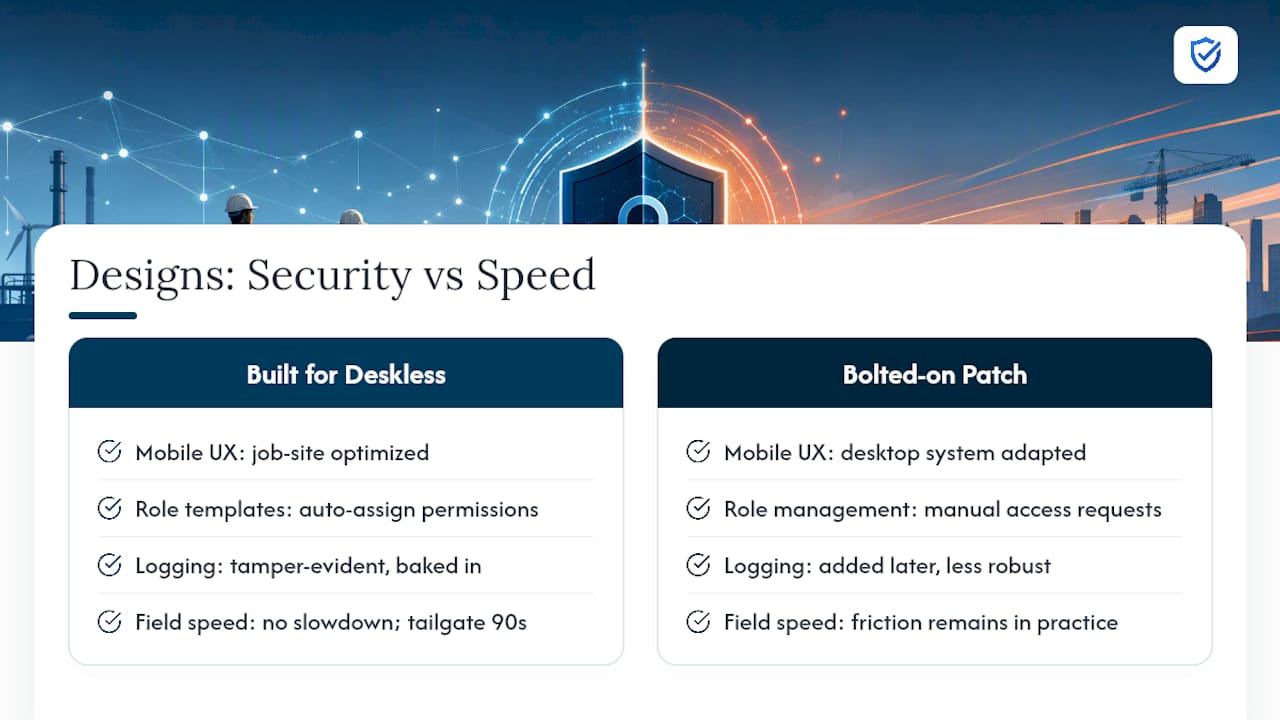
Tightening access always raises the same objection: won’t this slow crews down? In practice, it doesn’t, provided the mobile experience is built for the job site and not adapted from a desktop system. Role templates that assign the right permissions automatically remove the friction that usually comes from manual access requests. A supervisor who can complete a tailgate talk in ninety seconds on a phone doesn’t notice that their access is scoped to one crew instead of the whole company.
The trade-off that matters isn’t security versus speed. It’s whether your system was designed for deskless work from day one, with tamper-evident logging and role scoping baked in, or bolted on afterward as a compliance patch.
— Matthew Hoffman
How My Safety Solution Handles Access Control for You
My Safety Solution is built specifically to remove the manual work behind every control covered above, so safety teams in construction, manufacturing, and utilities aren’t stitching together spreadsheets and permission settings by hand. The platform assigns role-based permissions automatically across Admin, Safety Manager, Supervisor, and Worker tiers, generates tamper-evident, time-stamped audit logs for every meeting record, and revokes access the moment offboarding is processed, no manual cleanup required.

Field crews get a mobile workflow built for the job site, while compliance officers get audit-ready records without chasing down who edited what. If your team is currently managing access through spreadsheet permissions or a shared login, comparing plans is a reasonable next step. My Safety Solution offers Starter at $99 per month, Growth at $199 per month, and Business at $299 per month, with Enterprise pricing available on request. Start by reviewing the full platform overview and see which tier matches your crew size and audit needs.
Where These Access Control Standards Come From
The controls in this article draw on NIST’s guidance on least-privilege RBAC and quarterly access testing, HHS Security Rule guidance on audit-trail expectations, Microsoft’s Teams meeting protection guidance on recording and sharing controls, and ISPE’s analysis of tamper-evident audit-trail design. Insurance carriers reviewing safety documentation during claims audits, such as through DiamondBack Insurance’s audit process, also rely on this same kind of defensible record-keeping.
Sources
- HHS Security Rule guidance
- Microsoft Teams: configure meetings three tiers protection
- ISPE analysis of Part 11 audit-trail integrity
FAQ
What Is the Best Way to Restrict Access to Safety Records?
Combine role-based access control with mandatory MFA and an immutable audit trail, then set every new record to restricted by default. NIST’s guidance treats this combination as the baseline for least-privilege access in any high-risk operation.
Who Should Have Access to Safety Meeting Records?
Access should follow role and site scope: workers see their own records, supervisors see their crew’s records, and safety managers or compliance officers see full company-wide data. Platforms like My Safety Solution assign these tiers automatically through role templates instead of manual permission settings.
How Often Should Access Reviews Happen?
Quarterly or biannual reviews are the standard cadence recommended for catching permission creep before it becomes a compliance gap. Monthly reviews of the audit log itself are separately recommended by HHS Security Rule guidance to detect unusual activity sooner.
What Should Happen When an Employee Leaves?
Access should be revoked the same day termination is processed, ideally through automated identity provider integration rather than a manual ticket. Delayed offboarding is one of the most common sources of unauthorized access in audits.
Does My Safety Solution Support Role-Based Access Control?
Yes, My Safety Solution includes role-based permissions across Admin, Safety Manager, Supervisor, and Worker tiers, paired with tamper-evident audit logging. Current pricing for Starter, Growth, and Business plans starts at $99 per month, with Enterprise pricing available on request.