
For safety managers in high-risk, deskless industries, the best digital safety recordkeeping tools are cloud-based safety meeting management platforms that automate OSHA 300, 300A, and 301 form generation, capture mobile attendance with timestamps and signatures, and produce audit-ready exports on demand. My Safety Solution is built specifically for this use case. Your immediate next step: request a sample OSHA 300 export from any vendor you’re evaluating, and confirm that it includes full data lineage from the original incident record.
Three things to confirm before you commit to any platform:
- Automated generation of OSHA 300, 300A, and 301 forms with no manual re-keying
- Mobile and offline attendance capture with timestamped signatures for every tailgate meeting
- Audit-ready export formats (PDF, CSV, full audit packet) that an OSHA inspector can follow from a single row back to the source record
Table of Contents
- What does My Safety Solution actually do for recordkeeping?
- Why does OSHA recordkeeping demand more than a spreadsheet?
- How should you evaluate digital safety recordkeeping tools?
- What does deployment actually look like, and what will you save?
- How does My Safety Solution map to each recordkeeping requirement?
- What does pricing look like, and how do you run a pilot?
- Key Takeaways
- The gap most safety managers miss before they buy
- See how My Safety Solution fits your operation
- Useful sources
What does My Safety Solution actually do for recordkeeping?
My Safety Solution is a cloud-based safety meeting management platform built for construction, manufacturing, warehousing, utilities, transportation, and landscaping crews. It replaces the patchwork of spreadsheets and paper sign-in sheets that most field operations still rely on, replacing them with a single connected record from meeting creation through OSHA export.
Core capabilities that matter to buyers:
- OSHA 300/300A/301 automation: Forms are generated from incident data already in the system, with no re-keying.
- Digital attendance with timestamped signatures: Workers sign in on a mobile device; the record is locked with a timestamp and cannot be altered retroactively.
- Offline mobile capture: Field crews in areas without cell service can still complete attendance and meeting records; data syncs when connectivity returns.
- AI-powered safety topic generation: The platform draws from a preloaded, NLTAPA-aligned content library and can generate crew-specific topics based on industry, task, or recent incident trends.
- Multi-site and multi-company dashboards: Safety consultants and enterprise managers can oversee multiple crews or client accounts from a single view.
- Searchable audit trail: Every meeting, attendance record, and incident entry is indexed and retrievable for inspection.
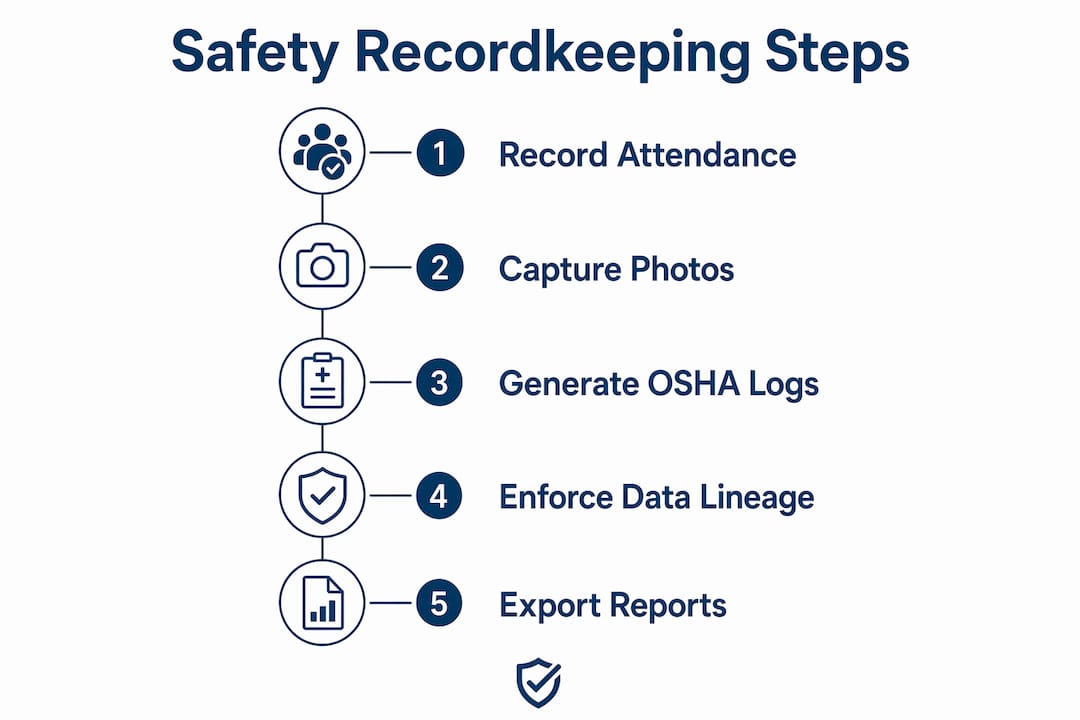
Picture a concrete crew finishing a morning tailgate meeting. The foreman runs the session on a tablet, workers sign digitally, and the platform captures the topic, attendees, timestamps, and any flagged hazards. That record is immediately available as an OSHA-ready export, with full lineage back to the original session.
Why does OSHA recordkeeping demand more than a spreadsheet?
OSHA’s recordkeeping rule (29 CFR 1904) requires covered employers to maintain an OSHA 300 log of work-related injuries and illnesses, a 300A annual summary, and a 301 incident report for each recordable event. Missing a filing or misclassifying an incident carries real consequences: citations, fines, and inflated Total Recordable Incident Rate (TRIR) and Days Away, Restricted, or Transferred (DART) figures that follow a company through insurance renewals and contract bids.
Automated classification of recordable incidents reduces human error and the risk of misclassification that can lead to fines or incorrect TRIR calculations. A spreadsheet cannot enforce that classification logic. It also cannot block a record from closing until the required 301 is filed, which is exactly the kind of workflow enforcement that prevents missed filings and strengthens audit defensibility.
Mobile-enabled attendance tracking with timestamps and signatures is a must-have for deskless crews, not a convenience feature. Proving that a specific worker attended a specific safety meeting on a specific date is the kind of documentation that matters during an OSHA inspection or a workers’ compensation dispute.
Warning: The most common inspection pain point is a 300 log row with no traceable lineage. If an inspector asks for the original 301 behind a log entry and you cannot produce it in minutes, the record looks incomplete regardless of whether the meeting actually happened.
Modern EHS platforms calculate TRIR and DART in real time using incident classification plus hours worked, and provide benchmarking against Bureau of Labor Statistics industry rates for leadership dashboards. That kind of live visibility is impossible with manual logs.
How should you evaluate digital safety recordkeeping tools?
Prioritize OSHA automation, mobile offline attendance, audit exports, role-based access, and integration capabilities with HR or payroll systems for hours-worked data. Everything else is secondary.
Mandatory feature checklist:
- Automated OSHA 300, 300A, and 301 generation from incident data
- Automated classification of recordable vs. non-recordable incidents
- Mobile attendance with timestamps, signatures, and offline capability
- Meeting session management with searchable records
- AI-powered or curated safety topic library
- Data export in PDF, CSV, and full audit packet formats
- Configurable data retention policies
- Integration pathways for HR/payroll (hours worked feed TRIR calculations)
Questions to ask during a vendor demo:
- Can you show me the data lineage from a single OSHA 300 row back to the original incident record?
- How does offline capture work when a crew has no cell service, and when does it sync?
- What is your data retention policy, and who owns the data if we cancel?
- How are TRIR and DART calculated, and can we benchmark against BLS industry rates?
- What is your SLA for updating the platform when OSHA changes a form or threshold?
Red flags to walk away from:
- No offline mobile support for field crews
- No audit trail linking a 300 log entry to its source record
- Manual incident classification with no enforcement logic
- Vague or absent data retention and backup policies
- Onboarding timelines measured in months, not weeks
Trust signals worth requesting:
- A case study showing reduced admin time or improved compliance metrics
- A sample audit export packet you can review before signing
- Role-based access logs showing who can edit what
- SOC 2 certification or equivalent data-security documentation
Field-focused UX — simple attendance flows, photo attachments, offline capability — is often the single biggest determinant of rollout success. A platform that field workers find difficult to use will not get used consistently, and inconsistent use destroys the audit trail.

What does deployment actually look like, and what will you save?
Cloud safety meeting management platforms typically reach pilot-ready status within a few weeks and full deployment within a few months, depending on the number of sites and the complexity of existing records.
High-level deployment timeline:
Deployment often involves stages such as initial pilot setup, a field pilot phase with live meetings and attendance capture, validation of export lineage and TRIR/DART calculations, onboarding and training, full rollout across sites, and a post-go-live audit check to verify data lineage.
EHS software replaces spreadsheet-and-binder workflows by creating single connected records from incident through investigation through corrective action through audit export, removing re-keying and improving data lineage for inspections. The administrative savings are most visible in the time spent preparing for an OSHA inspection or annual 300A posting.
Pro Tip: Start your pilot on a single crew or site and export a sample OSHA 300 and 300A before expanding. If the lineage holds up under a simulated inspection review, you have validated the core workflow. If it does not, you have found the gap before it costs you.
How does My Safety Solution map to each recordkeeping requirement?
My Safety Solution covers every mandatory OSHA and operational requirement in one platform. Here is how its features align:
| Requirement | My Safety Solution capability |
|---|---|
| OSHA forms automation (300/300A/301) | Auto-generated from incident data; PDF and CSV export with full data lineage |
| Mobile attendance and sign-in | Timestamped digital signatures; offline capture with automatic sync |
| AI topic generation and content library | NLTAPA-aligned library; AI-assisted topic selection by industry, task, or incident trend |
| Reporting and export (audit readiness) | On-demand audit packet export; searchable record index for inspection |
| User management and multi-site support | Role-based access for consultants, admins, managers, and workers; multi-company dashboards |
| Security and data retention | Configurable retention policies; locked, tamper-evident attendance records |
| Deployment and onboarding time | Pilot-ready in days; full deployment typically within several weeks |
| Pricing model | Tiered monthly subscription by employee count; multi-company options for consultants |
A regulatory workflow that prevents incident closure until required filings exist is the structural feature that separates audit-ready platforms from those that merely store data. My Safety Solution enforces that logic, which means a 300 log row always has a traceable 301 behind it.
What does pricing look like, and how do you run a pilot?
Pricing for cloud safety meeting management platforms is typically tiered monthly by employee count, with optional add-ons for multi-company dashboards and advanced compliance modules. My Safety Solution follows this model, with plans scaling based on workforce size and feature access.
What affects your price:
- Number of employees or active users
- Multi-company or multi-site dashboard access (relevant for safety consultants managing several clients)
- Advanced compliance modules or integrations
How to structure a pilot before committing:
- Identify one site or crew of a manageable size for a trial period of about a month
- Configure OSHA form templates and role-based access during setup
- Run several tailgate meetings and capture attendance digitally
- Export a sample OSHA 300 and 300A at the end of the pilot period to review data lineage
- Validate data lineage and confirm TRIR/DART calculations against your manual records
Onboarding typically includes configuration support, form template setup, and admin training. For construction crews and other deskless workforces, industry-specific templates accelerate setup considerably. My Safety Solution also offers configuration templates for manufacturing, warehousing, utilities, and trucking, which shortens the time from contract to first live meeting.
Key Takeaways
Digital safety recordkeeping tools that automate OSHA 300/300A/301 generation, enforce data lineage, and capture mobile attendance with timestamps are the only reliable path to audit readiness for deskless, high-risk workforces.
| Point | Details |
|---|---|
| Require OSHA form automation | Confirm the platform auto-generates 300, 300A, and 301 from incident data with no manual re-keying. |
| Insist on mobile offline attendance | Timestamped, tamper-evident signatures must work without cell service and sync automatically. |
| Validate audit export and lineage | Request a sample audit packet and trace one 300 row back to its source 301 before signing. |
| Run a 30-day single-site pilot | Pilot on one crew, export OSHA forms, and verify core recordkeeping calculations before full rollout. |
| My Safety Solution | Covers all five requirements above with a tiered subscription and industry-specific templates for fast deployment. |
The gap most safety managers miss before they buy
The conversation around digital safety recordkeeping tools tends to focus on features: does it generate OSHA forms, does it work on mobile, does it export to PDF? Those are necessary questions, but they are not sufficient. The more revealing question is whether the platform enforces the process that produces a defensible record, not just stores the output.
A platform that lets a safety manager close an incident without a completed 301 is not an audit-ready system. It is a digital filing cabinet with the same structural weakness as a spreadsheet. The difference between a platform that passes an OSHA inspection and one that creates liability is usually not the form template. It is whether the workflow prevents the shortcuts that create gaps.
The other underestimated factor is field adoption. A platform that site leads find clunky will be used inconsistently, and inconsistent use produces the exact gaps an inspector will find. Evaluating UX during a pilot, with actual field workers, is not optional. It is the most important test you can run.
See how My Safety Solution fits your operation
Safety managers who need OSHA 300/300A/301 automation, mobile attendance tracking, and audit-ready exports without a months-long implementation have a direct path forward with My Safety Solution. The platform is built for the industries where recordkeeping failures carry the highest cost: construction, manufacturing, warehousing, utilities, and transportation.

The fastest way to validate fit is a structured pilot. Configure one site, run four weeks of tailgate meetings, and export your first OSHA 300. If the lineage holds and the field crew uses it consistently, you have your answer. Visit the My Safety Solution manufacturing page to see industry-specific templates and start a free trial, or go to mysafetysolution.com to create an account and request a sample audit export for your industry.
Useful sources
- My Safety Solution | OSHA Compliance Meeting Software — Product overview covering automated meeting records, AI topic generation, timestamped attendance, and audit-ready export capabilities.
- Construction safety statistics | My Safety Solution — Industry data on incident rates and the operational cost of recordkeeping failures in high-risk sectors.
- Common permit submission mistakes | MiamiPermitAI — Practical guidance on compliance documentation errors in construction; useful context for teams managing both safety records and permit workflows.