
Role-based access control (RBAC) is an access management model that assigns permissions to roles rather than to individual users, granting access based on job responsibilities rather than personal identity. RBAC is the foundation of least-privilege enforcement and supports compliance frameworks including HIPAA, GDPR, SOC 2, and NIST 800-53. For IT security professionals and compliance officers, role based access control best practices determine whether an organization’s access model holds up under audit or quietly accumulates risk. Getting RBAC right requires deliberate role design, automation tied to HR workflows, and governance that never stops. This article covers each layer with the specificity your program needs.
What are the best practices for role-based access control design?
Effective RBAC starts with roles that reflect actual business functions, not technical systems. The biggest design mistake is building roles around applications or databases rather than around what employees actually do. A role named “SQL_ReadWrite_Prod” describes a system. A role named “Financial Analyst” describes a job function. The second approach survives reorganizations, audits, and system migrations far better than the first.
For a mid-to-large organization, the right starting point is a baseline of 20–30 business roles for a 5,000-person workforce. That number sounds low, but it forces clarity. You add granularity only when a distinct access pattern genuinely exists, not because a manager requested a custom setup.
Role mining works best when you combine two directions:
- Top-down: Map roles to job functions, departments, and workflows defined by HR and business leadership.
- Bottom-up: Analyze actual access patterns in your systems to identify what permissions users currently hold and cluster them into logical groups.
- Hierarchy depth: Limit role inheritance to 3–4 levels. Deep hierarchies create complexity that obscures who has access to what.
- No one-off roles: Avoid creating roles for one or two users. Assign direct permissions for rare cases instead of inflating the role catalog.
- Split, don’t merge: When a broad role needs to be divided, split it into two narrower roles. Merging overlapping roles later creates disruption and audit gaps.
Pro Tip: When you find yourself naming a role after a person’s name or a specific project, stop. That is a direct permission assignment masquerading as a role. Handle it with a direct grant and document the exception.
Every role should carry a formal definition: name, description, owner, list of permissions, and assignment criteria. Without that documentation, your role catalog becomes a liability during a SOC 2 audit or an HIPAA review.

How does automation improve RBAC implementation?
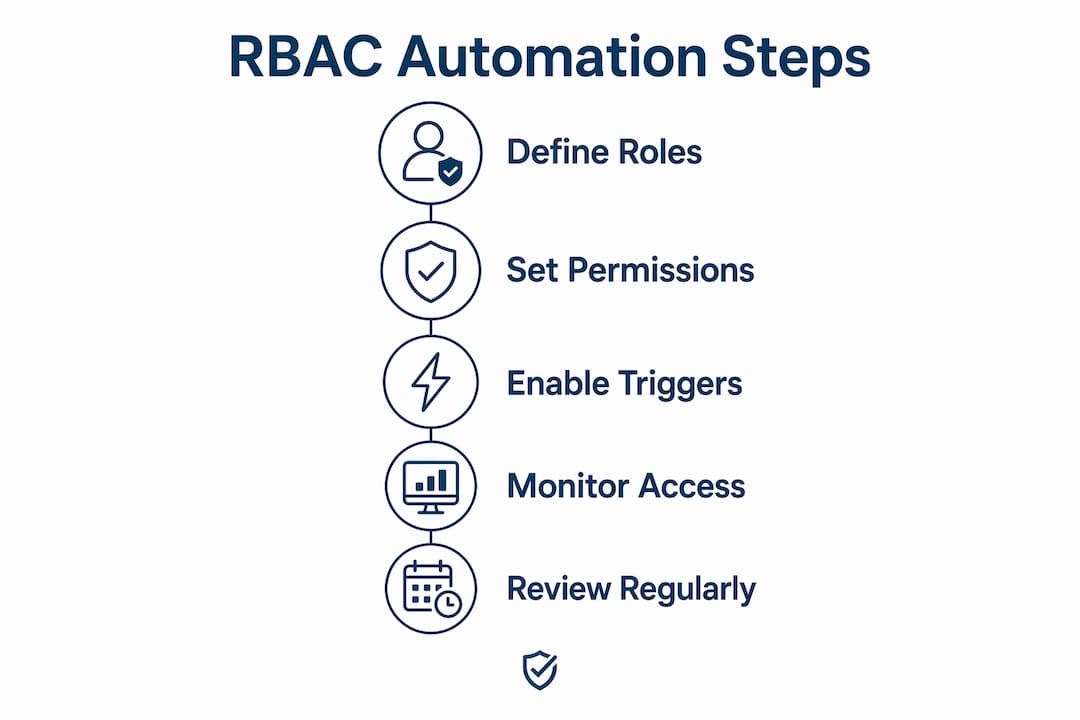
Manual role assignment is the single largest source of errors in RBAC programs. Automating role assignments through HR lifecycle triggers eliminates the lag between a job change and an access change. When an employee is hired, transferred, or terminated, the identity system should provision or deprovision roles without a ticket being opened.
A phased rollout protects the organization during the transition. Phased implementation reduces operational disruption compared to a full cutover. The sequence that works in practice looks like this:
- Inventory and baseline: Document all current access rights and map them to candidate roles before writing a single policy.
- Pilot with one department: Deploy RBAC for a single business unit, validate role definitions, and measure exception rates.
- Integrate with your identity provider: Separate role membership management from policy logic by using an identity provider (IdP) such as Okta, Microsoft Entra ID, or a SCIM-compatible directory. This keeps role assignments out of application code.
- Automate HR triggers: Connect your HR system to the IdP so that hire, transfer, and termination events automatically adjust role memberships.
- Expand by department: Roll out to additional business units, applying lessons from the pilot before scaling.
- Implement Just-in-Time access: Replace standing privileged roles with time-limited elevated access that requires approval and expires automatically.
Pro Tip: Just-in-Time (JIT) access is not just a privileged access management feature. Apply it to any role that grants write or delete permissions on sensitive data. Require approval and set a four-hour expiration window. The friction is minimal; the risk reduction is significant.
Zero Trust architectures depend on RBAC as a core control. When you integrate RBAC with a Zero Trust framework, role membership becomes one of several signals used to authorize each request, alongside device health and network context. That integration makes your access model far more resilient than role assignment alone.
For organizations managing deskless workforces, role-based safety management in warehousing and distribution environments shows how automated role triggers translate directly to field operations, where a worker’s access to safety systems must update the moment their job function changes.
How do you maintain RBAC governance over time?
RBAC is a permanent program, not a project with a completion date. Treating RBAC as ongoing governance rather than a one-time deployment is the difference between a program that holds up under audit and one that quietly accumulates stale permissions. Without active governance, role sprawl and permission creep appear within 12–24 months of deployment. That timeline is short enough to affect your next annual audit.
Governance requires a defined cadence and clear ownership:
- Quarterly certifications: Require managers and application owners to certify that each user’s role assignments remain appropriate. Remove any assignment that cannot be justified.
- Role owners: Assign a named owner to every role. That person is accountable for keeping permissions current and approving new assignments.
- Exception tracking: Log every direct permission grant that bypasses the role model. Review exceptions monthly and convert recurring patterns into formal roles.
- Separation of Duties monitoring: Run automated checks to detect users who hold conflicting role pairs. A user who can both create and approve a purchase order is a control failure, not an edge case.
- Health metrics: Track role-to-user ratios, exception counts, and certification completion rates. A rising exception count signals that your role catalog no longer matches business reality.
Documentation is the audit trail that regulators and auditors actually examine. Every role record should include the role name, a plain-language description, the assigned owner, the full permission set, and the criteria for assignment. Without that record, a HIPAA or GDPR audit becomes a manual reconstruction exercise under time pressure.
What are the nuances of SoD, hierarchies, and hybrid access models?
RBAC handles most enterprise access scenarios well, but three areas require careful handling: Separation of Duties (SoD), role hierarchies, and integration with attribute-based access control (ABAC).
Enforcing SoD constraints means defining which role pairs are mutually exclusive and preventing any single user from holding both. In financial systems, the roles “Invoice Creator” and “Payment Approver” must never coexist for one user. In healthcare, “Prescriber” and “Pharmacy Dispenser” represent the same conflict. SoD rules belong in your identity governance platform, not in a spreadsheet.
Role hierarchies simplify inheritance but create risk when they grow too deep or too wide. The table below compares the two common hierarchy patterns:
| Hierarchy pattern | Maximum depth | Inheritance type | Risk level |
|---|---|---|---|
| Linear single-parent | 3–4 levels | Single | Low |
| Multi-parent (diamond) | 2–3 levels | Multiple | High |
Multi-parent inheritance, where a child role inherits from two or more parent roles, creates permission overlap that is difficult to audit. Avoid it unless your access model explicitly requires it.
RBAC alone cannot handle every authorization scenario. When access decisions depend on context, such as time of day, location, or data classification level, ABAC fills the gap. The practical approach is to use RBAC for coarse-grained access (who can enter the system) and ABAC for fine-grained decisions (which records they can see within it). This hybrid model keeps role catalogs manageable while supporting complex compliance requirements.
Pro Tip: Before integrating ABAC, document every scenario where a role alone cannot make the correct access decision. If you have fewer than ten such scenarios, ABAC may add more complexity than it solves. Start with RBAC and add ABAC attributes only where the gap is clearly defined.
For public sector and municipal operations, phased RBAC rollouts in field environments demonstrate how hierarchy and SoD principles apply beyond traditional enterprise IT.
Key Takeaways
Effective RBAC requires role designs tied to business functions, automation through HR lifecycle triggers, and governance that runs continuously rather than ending at deployment.
| Point | Details |
|---|---|
| Design roles around job functions | Build roles that reflect what employees do, not which systems they access. |
| Start with a small role baseline | A 5,000-person organization needs only 20–30 initial roles; add granularity as patterns emerge. |
| Automate with HR triggers | Connect hire, transfer, and termination events to role provisioning to eliminate manual errors. |
| Govern continuously | Run quarterly certifications, track exceptions, and assign role owners to prevent permission creep. |
| Enforce SoD and use JIT for privilege | Define conflicting role pairs and replace standing elevated access with time-limited approvals. |
The governance gap most RBAC programs never close
I have reviewed RBAC programs at organizations ranging from 300-person manufacturers to multi-site healthcare networks. The technical implementation is rarely the failure point. The governance gap is.
Most teams treat the initial deployment as the finish line. Roles get defined, policies get written, and the project gets closed. Eighteen months later, the role catalog has doubled in size, exceptions outnumber formal assignments in certain applications, and no one can name the owner of half the roles in the system. That is not a technology problem. It is a discipline problem.
The organizations that sustain clean RBAC programs share one habit: they treat role certification the same way they treat financial close. It happens on a fixed schedule, it has named accountable owners, and incomplete certifications are escalated. There is no “we’ll get to it next quarter.”
The other pattern I see consistently is the failure to align roles with actual business workflows. Security teams design roles in isolation, then wonder why managers keep requesting exceptions. When a role does not match how work actually flows through a department, exceptions are not a sign of bad actors. They are a sign of a bad role design. Fix the role, not the exception process.
Automation is the only way to keep pace with workforce change at scale. Manual provisioning introduces lag, and lag means a terminated employee’s access outlives their employment. That is not a theoretical risk. It is a recurring finding in access reviews across industries.
“Balancing field accessibility with corporate data governance is essential for modern safety teams. MySafetySolution enforces granular role permissions that keep sensitive records protected while giving field leaders the tools they need.”
— Matthew Hoffman, President - MySafetySolution
How My Safety Solution supports compliance and access governance

Compliance programs in high-risk industries face the same core challenge as RBAC: the right people need the right access to the right information, and every action needs an audit trail. My Safety Solution addresses that challenge for deskless workforces in construction, manufacturing, utilities, and transportation. The platform automates safety meeting management, tracks attendance, and generates digital compliance records that satisfy OSHA audit requirements without manual reconstruction.
For safety managers and compliance officers who need role-based governance over who conducts meetings, who reviews records, and who receives safety communications, My Safety Solution’s compliance platform provides the structure and accountability that manual processes cannot. Explore how the platform supports your compliance workflows and reduces administrative burden across your workforce.
FAQ
What is role-based access control?
Role-based access control (RBAC) is an authorization model that assigns permissions to roles defined by job functions, then assigns users to those roles rather than granting permissions directly to individuals.
How many roles should an organization start with?
A 5,000-person organization should start with 20–30 business roles and add granularity only when a distinct access pattern requires it, avoiding role sprawl from the start.
What is the difference between RBAC and ABAC?
RBAC grants access based on a user’s assigned role, while ABAC makes access decisions based on attributes such as location, time, or data classification. The two models work best in combination.
How often should role assignments be reviewed?
Role assignments should be certified quarterly by managers and application owners. Any assignment that cannot be justified during certification should be removed immediately.
What causes role sprawl in RBAC programs?
Role sprawl results from creating one-off roles for individual users, failing to remove stale roles after job changes, and skipping regular governance reviews. Without active lifecycle management, sprawl appears within 12–24 months of deployment.