
A safety documentation audit is a structured review that checks whether written safety programs, records, and permits match what actually happens on the floor or the job site. Done right, following OSHA and ISO 45001 principles, it produces defensible evidence that your safety system is documented, actually in use, and works. Platforms like My Safety Solution make that evidence easier to capture and prove.
TL;DR:
- Audits should sample 10 to 20 percent of records per domain to verify hazard identification, training, permits, and incident documentation are current and in use.
- Field verification involves photographing posted permits, inspection tags, and safety equipment while capturing timestamps to corroborate documentation.
- Findings are categorized as conforming, observing, minor non-conformance, or major non-conformance, with clear evidence-based descriptions and assigned corrective actions.
- Automated digital recordkeeping that includes timestamps, signatures, and exportable reports significantly reduces audit preparation time, especially across multiple sites.
- Common audit errors include relying on outdated paperwork, incomplete evidence, and closing corrective actions on paper alone without practical implementation.
Table of Contents
- What a Safety Documentation Audit Actually Covers
- Core Checklist Domains and the Evidence Behind Them
- The Step-by-Step Audit Workflow
- Turning Observations Into Defensible Findings
- Making Corrective Actions Stick
- Digital Recordkeeping That Survives an Audit
- What Most Audits Get Wrong
- A Faster Path to Audit-Ready Records
- Where to Find the Official Audit Standards
- Sources
- FAQ
What a Safety Documentation Audit Actually Covers
A documentation audit is not the same thing as a walk-through inspection. An inspection catches a missing guardrail or a blocked exit today. A documentation audit asks a harder question: does the paperwork trail prove your safety system operates the way it claims to, week after week? Both matter, but they answer different problems.
Audits generally fall into three types. A compliance audit checks conformity against a specific regulation, such as OSHA recordkeeping rules. A program audit reviews one function, like fall protection or lockout/tagout, in depth. A management-system audit evaluates whether the whole safety system has been established, implemented, maintained, and proven effective, a distinction laid out clearly in FMCSA’s audit guidance.
Before anything else, define scope: which sites, which time period, and which standard you’re auditing against. Then assign an independent auditor or team, someone without direct operational responsibility for the area under review. Independence is what keeps findings credible when regulators or insurers ask questions later.
Core Checklist Domains and the Evidence Behind Them
Every defensible audit organizes around a manageable set of domains rather than a scattershot list of documents. Six areas cover most workplace safety systems:
- Policy and leadership: signed safety policy, management review minutes, resource allocation records
- Hazard identification and JHAs: job hazard analyses, risk registers, updated within the last review cycle
- Training and competence: training matrices, certifications, toolbox talk attendance logs
- Contractor and permit management: permits to work, contractor prequalification files, hot work or confined space permits
- Emergency preparedness: evacuation plans, drill logs, equipment inspection tags
- Monitoring and corrective actions: incident logs, near-miss reports, closed CAP records
For each domain, apply what OSHA’s own audit tool treats as central: verifying hazard identification, training records, and documentation controls rather than just their existence. This is where the documented / in use / works test earns its place. A written JHA is documented. Workers referencing it before a task means it’s in use. Incident rates trending down in that task category means it works. A three-column checklist that scores all three, with an evidence-seen column attached, catches gaps that a simple yes/no checklist hides entirely.
Sampling doesn’t require reviewing every file. Pull a representative slice, usually 10 to 20 percent of active records per domain, and flag red flags immediately: training dates that don’t match hire dates, permits signed after the work started, or JHAs that haven’t been revised despite a process change.
The Step-by-Step Audit Workflow
A documentation audit runs cleanest when it follows a fixed sequence rather than jumping between paperwork and the floor.
- Plan the audit. Define scope, the standard you’re auditing against, an evidence request list sent to site leadership in advance, and a written independence statement confirming the auditor has no operational stake in the outcome.
- Review documents first. Sample records by domain, marking each item as evidence and scoring it against the documented / in use / works framework before you talk to anyone.
- Interview to confirm “in use.” Ask three or more workers, chosen at random rather than handpicked by a supervisor, the same procedural question. Divergent answers usually mean the system is written down but not actually followed.
- Verify in the field. Spot-check what the documents claim. Photograph the permit posted at the job box, the fire extinguisher inspection tag, the guardrail height. Capture timestamps with every image.
- Report by element, not by anecdote. Organize findings under each domain with the standard audited against, dates, auditor name, element-level scores, and an evidence-backed executive summary, following the report structure safety audit templates commonly recommend.
Pro Tip: Ask the same “in use” question of at least three people on different shifts. If you get three different answers, you’ve found an observation before you’ve even opened a file cabinet.
Turning Observations Into Defensible Findings
Every finding needs a rating, and vague language is where audits lose credibility during a regulatory review. Four categories cover nearly every situation:
- Conforms: documented, in use, and works, with evidence to support all three
- Observation: minor gap with no immediate risk, worth tracking
- Minor non-conformance: a requirement isn’t met, but the risk is contained
- Major non-conformance: a requirement isn’t met and exposes workers or the business to real risk
A finding should read like evidence, not opinion: “JHA for confined space entry (Doc #CS-114) is documented and signed, but two of three interviewed workers could not describe the entry procedure. Rated minor non-conformance. Corrective action: refresher training scheduled, owner: site supervisor.”
| Rating | Documented | In use | Works |
|---|---|---|---|
| Conforms | Yes | Yes | Yes |
| Observation | Yes | Partial | Yes |
| Minor NC | Yes | No | Unclear |
| Major NC | No or outdated | No | No |
Roll element scores up into a summary table for management review, so leadership sees the pattern across domains, not just isolated line items.
Making Corrective Actions Stick
A finding without a closed loop is just a paper trail nobody reads twice. Prioritize corrective action plans (CAPs) by severity first and legal exposure second. A major non-conformance tied to a permit-required confined space always outranks a missing signature on a toolbox talk sheet.
- Assign every CAP a named owner, not a department
- Require specific closing evidence: updated procedure documents, new training records, or timestamped photos of a corrected condition
- Put interim controls in place immediately for anything rated major, even before the permanent fix is done
- Set a re-inspection date and confirm closure at the next management review meeting
- Communicate CAP status openly so workers see that findings lead to real change, not silence
Digital Recordkeeping That Survives an Audit
Paper folders and scattered spreadsheets are the most common reason audits drag out for weeks instead of days. A record that’s actually audit-ready carries a handful of specific traits:
- Current version number and revision date visible on the document itself
- Timestamp and digital signature tied to the person who completed it
- Evidence attachments, photos, or scanned permits linked directly to the record
- Searchable metadata so an auditor can pull every training record for one worker in seconds, not hours
Exportable audit packages matter just as much as the records themselves. When a regulator or insurer asks for proof, you want one clean export, not a scramble through email threads. Digital checklist tools that attach photos, timestamps, and generate exportable reports cut audit prep time significantly compared to manual reconstruction. Automated attendance and meeting logs serve exactly this purpose: they prove a topic was covered, who attended, and when, which is the “in use” leg of the audit stool that paper sign-in sheets routinely fail to support. For a look at organizing this kind of evidence, see how construction document control practices structure meeting records for audit readiness.
Offline paper records are still acceptable in plenty of operations, but they need the same rigor: dated, signed, cross-referenced to a master log, and stored where they can be retrieved within hours, not days.
Pro Tip: If it takes your team longer than half a day to assemble a full evidence package for one site, your recordkeeping system is the audit risk, not your safety program.
What Most Audits Get Wrong
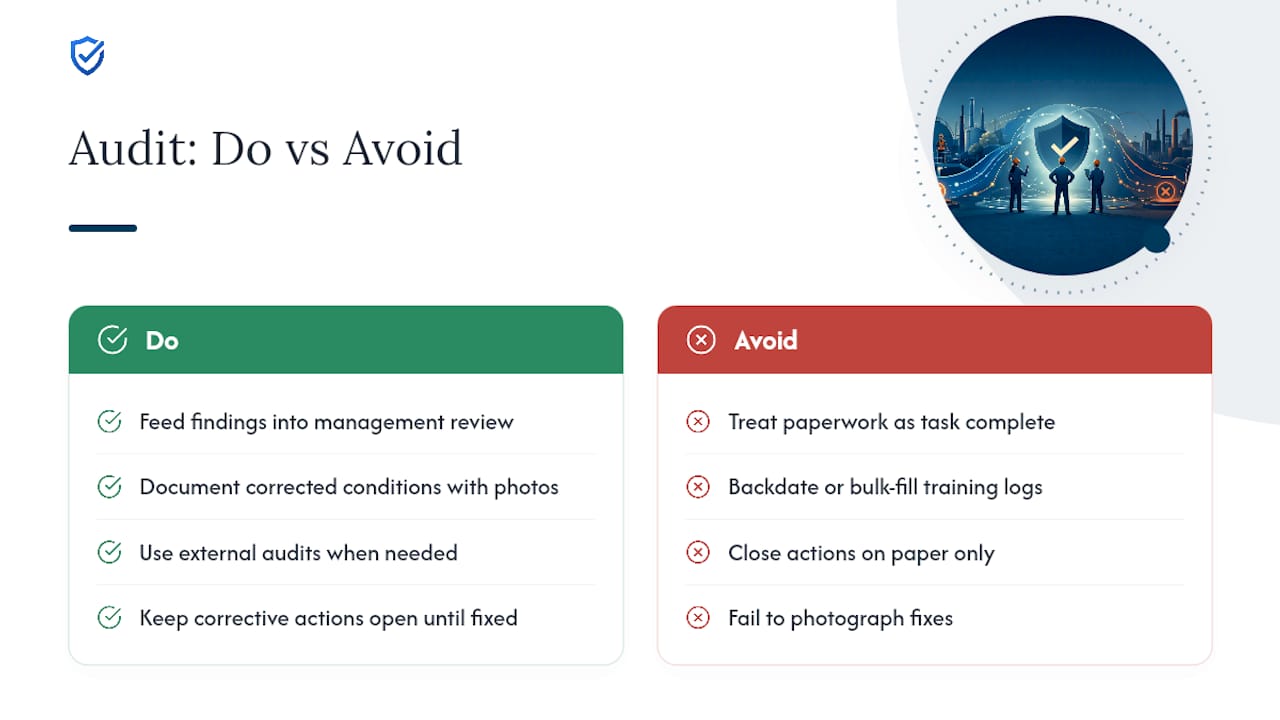
The same handful of mistakes show up across most workplace audits. Paperwork exists but nobody references it on the job. Training logs get filled out in bulk after the fact instead of in real time. Evidence goes missing because nobody photographed the corrected condition. Corrective actions close on paper long before they close in practice.
External audits earn their cost when internal teams lack independence or when a major incident demands outside credibility. Feed every finding, closed or open, back into your management review cycle. That’s how a documentation audit stops being a compliance chore and starts functioning as a real improvement engine.
“During an audit, disorganized records create an immediate impression of lax safety management. MySafetySolution creates structured, verifiable digital archives that prove your safety program is actively managed every day.”
— Matthew Hoffman, President - MySafetySolution
A Faster Path to Audit-Ready Records
Manual recordkeeping works until an auditor asks for six months of attendance logs across three sites, and someone spends a full day pulling paper files together. This kind of software replaces that scramble with automated, timestamped digital records that already carry signatures, attendance, and topic content in one exportable package.

For a single site with infrequent audits, manual logs might still get the job done. Once you’re managing multiple crews, multiple locations, or regulators who show up with little warning, automated capture stops being a convenience and starts being the difference between a same-day audit response and a week of digging. The platform’s safety meeting software captures the “in use” evidence with every signed, time-stamped session, and its searchable records export as PDF with a sign-off page. Start your 15-day free trial and pull your next audit-ready export before your next site visit.
Where to Find the Official Audit Standards
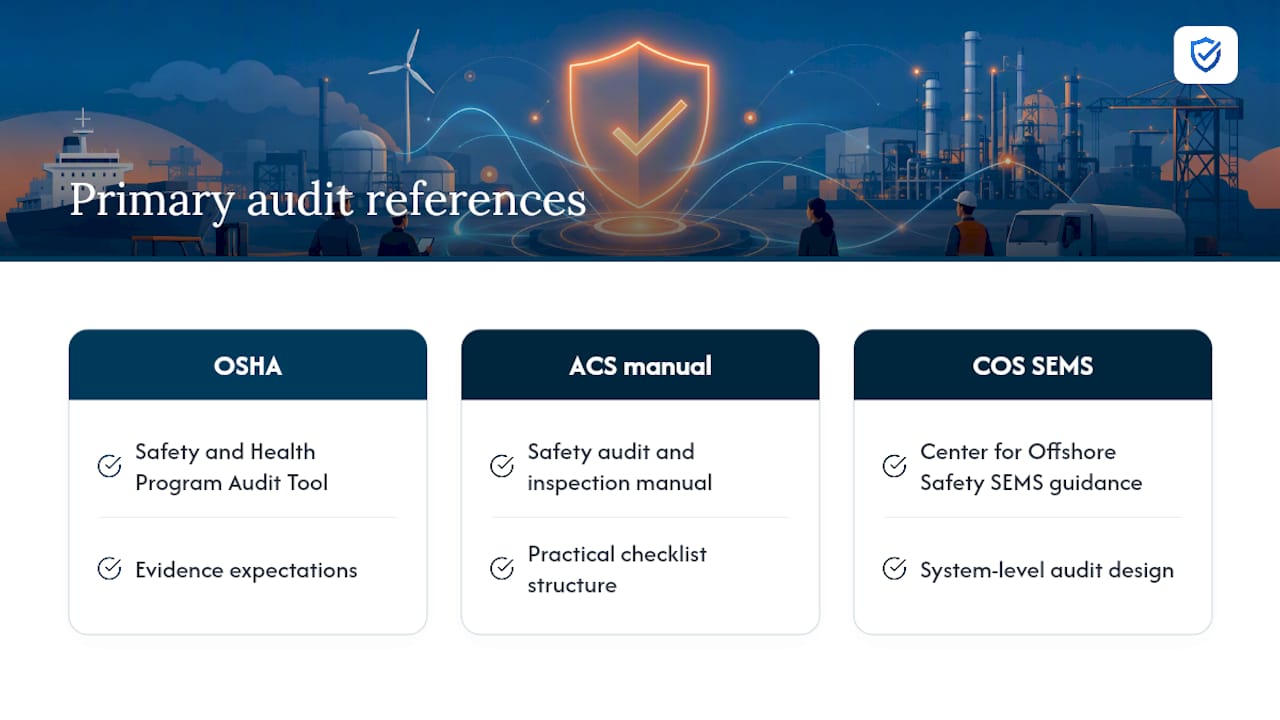
Keep these primary references on hand for any formal audit: the OSHA Safety and Health Program Audit Tool for evidence expectations, the ACS safety audit and inspection manual for practical checklist structure, and the Center for Offshore Safety’s SEMS audit guidance for system-level audit design.
Sources
FAQ
What does a safety audit include?
A safety audit typically includes document review, worker interviews, and field verification to confirm that written programs, training records, and permits reflect actual practice on site.
What are examples of audit documentation?
Common examples are job hazard analyses, training matrices, permit-to-work records, incident and near-miss logs, emergency drill records, and closed corrective action reports, all supported by exportable digital evidence like timestamped attendance logs from tools such as My Safety Solution.
What are the 5 C’s of auditing?
Definitions vary across industries, but a commonly used version refers to Criteria, Condition, Cause, Consequence, and Corrective action, the elements auditors document for each finding.
Does OSHA require safety audits?
OSHA does not universally mandate audits by name, but its Safety and Health Program Audit Tool outlines the hazard identification, training, and documentation controls that employers are expected to maintain and that many voluntary and required program reviews are built around.