
An interactive safety meeting replaces the one-way lecture with two-way dialogue: workers describe hazards they’ve actually seen, supervisors demonstrate the fix, and the group leaves with one action item. Run it for about ten to fifteen minutes with a site-specific focus, and you get two clear signals of success: workers speaking up unprompted, and a documented follow-up completed promptly. That brevity isn’t a shortcut. It’s what keeps a talk aligned with OSHA’s preference for focused, demonstration-based training.
TL;DR:
- Interactive safety meetings should last 10 to 15 minutes, focus on site-specific hazards, and include a documented follow-up within 48 hours.
- The most effective formats are toolbox talks for small crews or weekly briefings, micro-workshops for hands-on practice, and safety rounds for dispersed crews.
- Engaging activities like hazard scavenger hunts, scenario role-plays, or photo discussions require only a short setup and can significantly boost participation.
- A standardized 12-minute structure with an open question, relevant demo, and action assignment enhances consistency and keeps workers engaged.
- Digital sign-in and a ready-made topic library streamline recordkeeping, improve audit readiness, and free supervisors to focus on meaningful facilitation.
Table of Contents
- What Format Fits Your Crew: Huddles, Toolbox Talks, or Micro-Workshops?
- Engagement Activities Supervisors Can Run Tomorrow Morning
- How Do You Run a 12-Minute Interactive Safety Meeting?
- Making Every Talk Feel Relevant to the Work at Hand
- What Counts as an Audit-Ready Attendance Record?
- What Does an Automated Meeting Workflow Look Like in Practice?
- A Supervisor’s Take on Ditching the Script
- Where My Safety Solution Fits Into Your Meeting Routine
- Sources
What Format Fits Your Crew: Huddles, Toolbox Talks, or Micro-Workshops?
Not every safety conversation needs the same container. Small crews and large warehouse shifts call for different formats, and picking the wrong one is why so many “interactive” meetings default back to a supervisor reading off a clipboard.
Here’s how to match format to situation:
- Pre-shift huddle (5 minutes): Best for small crews needing a quick hazard check before starting work. Cover one task-specific risk and confirm PPE.
- Toolbox talk (10 to 15 minutes): The workhorse format for daily or weekly briefings. Fits crews of 5 to 25 and allows time for an opening question, a short demo, and discussion.
- Micro-workshop (20 to 30 minutes): Reserve for new equipment rollouts, incident debriefs, or a hazard that needs hands-on practice, like proper lifting technique or lockout-tagout steps.
- Safety rounds (ongoing, informal): A supervisor walks the site and holds two-minute conversations at each work area. Useful for spread-out crews where gathering everyone is impractical.
- Multi-language crews: Toolbox talks work best here when paired with a bilingual peer translator rather than a printed handout, since live translation keeps the back-and-forth intact.
- Spread-out or multi-site briefings: A short video call or recorded demo, followed by a text-based confirmation, can substitute for an in-person huddle when crews are scattered across job sites.
OSHA’s own activities guidance points supervisors toward turning drills into interactive learning experiences rather than passive readings, which is exactly what separates a toolbox talk from a memo.
Engagement Activities Supervisors Can Run Tomorrow Morning
You don’t need new equipment or a training budget to make a talk interactive. You need a five-minute setup and a willingness to hand the floor to your crew.
- Hazard scavenger hunt. Give workers two minutes to spot three hazards on-site, then discuss findings as a group. Materials: none. Prompt: “What’s the first thing you’d fix before we start?”
- Safety bingo. Preprint cards with common hazards or PPE items; call them out during the shift and mark hits. Works well for repetitive-task crews who need a lighter format.
- Minute-to-win-it hazard demo. Time a worker fixing a simulated hazard (a loose guardrail, a tangled cord) in 60 seconds. Builds muscle memory fast.
- Role play a near-miss. Two workers act out a close call from memory; the group discusses what should happen next time. Caution: never reenact anything involving real injury, only near-misses.
- Near-miss storytelling. Ask one volunteer to share a real near-miss from the past month. This format drives the strongest engagement because it’s true and it’s local.
- Hazard-photo discussion. Pull up a phone photo from the site taken that morning and ask, “What’s wrong with this picture?”
- Equipment inspection relay. Split into pairs; each inspects a piece of equipment and reports one finding.
- Quick quiz with a show of hands. Ask a true/false safety question tied to the day’s task; no materials needed.
- PPE check-in. Have each worker state one piece of PPE they’re wearing and why it matters for today’s task.
- “What would you do?” scenario. Read a short hazard scenario and ask the group to vote on the correct response.
Small incentives, a coffee gift card, an extra break, can lift participation, but keep scoring optional. Competitive games can unintentionally exclude workers who are new, injured, or uncomfortable with public performance, so always offer a non-competitive alternative.
How Do You Run a 12-Minute Interactive Safety Meeting?
Consistency beats improvisation. A repeatable structure means your crew knows what to expect and shows up ready to participate, not just listen.
Here’s a timing breakdown that works for most toolbox talks:
- Minutes 0 to 1: Open with a hook, not a greeting. Try: “Before we start, who saw something yesterday that made them pause?”
- Minutes 1 to 3: State the day’s topic and why it’s relevant to today’s specific task, not a generic policy reminder.
- Minutes 3 to 6: Run a short demo or show a site photo. Ask an open-ended question.
- Minutes 6 to 10: Open the floor. Six questions that reliably generate discussion: “What’s changed on-site since yesterday?” “Where have you seen this hazard before?” “What would you do differently?” “Who’s used this equipment before, and what should we watch for?” “What’s the worst-case outcome if we skip this step?” “What do you need from me to do this safely?”
- Minutes 10 to 12: Assign one follow-up action, name an owner, and confirm attendance.
Facilitator checklist: prepare your hook the night before, bring one visual (photo or demo item), ask at least one open question, assign exactly one action, and record the meeting before the crew disperses. Peer-reviewed work on toolbox talks backs this format, tailored, participatory sessions measurably increase talk frequency and self-reported safer behavior compared to lecture-style briefings.
Pro Tip: Whatever hazard a worker raises, close the loop within 48 hours, even if the answer is “we’re still working on it.” Crews stop speaking up the moment they sense their input disappears into a void.
Making Every Talk Feel Relevant to the Work at Hand
Generic content is the fastest way to lose a room. A practical approach is to have most talks based on that day’s actual site conditions while covering scheduled topics systematically over time to ensure comprehensive coverage.
Practical ways to keep talks personal:
- Walk the site the evening before or during shift handover, and choose tomorrow’s topic based on what you actually see.
- Use a photo taken that morning instead of a stock image, workers respond differently to a hazard they recognize.
- Pair bilingual crew members as peer translators during discussion, rather than relying solely on printed materials.
- Break a large crew into smaller groups of five or six for the discussion portion, then report back one key point per group.
This approach lines up with what the construction-specific topic guidance recommends: pick relevance over routine, every time.
What Counts as an Audit-Ready Attendance Record?
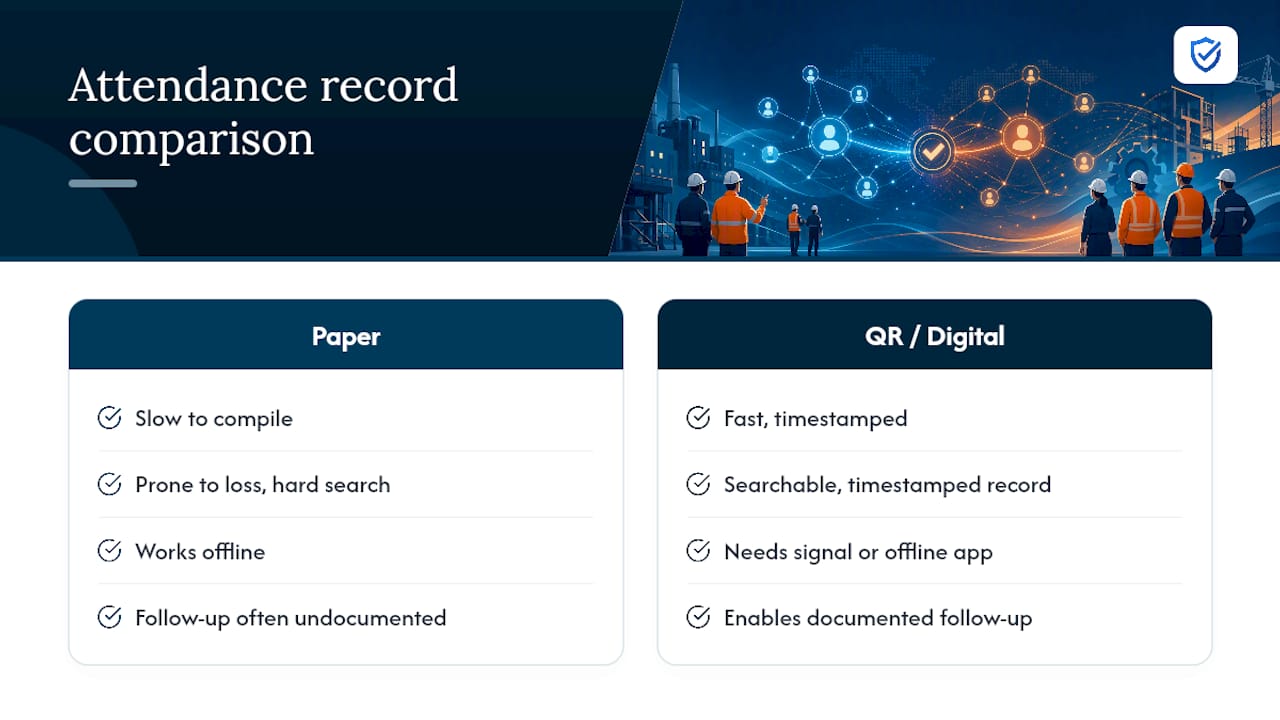
A compliant record needs five fields, at minimum: date, topic, list of attendees, name of the leader, and the assigned follow-up action. Missing any one of these turns a solid meeting into a documentation gap during an audit.
Paper sign-in sheets are familiar and require no technology, but they’re slow to compile, easy to lose, and nearly impossible to search when an inspector asks for six months of records. QR-code or digital sign-in works on any smartphone browser, no app download required, and produces a timestamped, searchable record in seconds. The tradeoff is that digital tools need either connectivity or an offline-capable app to work reliably on isolated sites.
Follow-up visibility matters more than most supervisors assume. Research on tailored toolbox-talk interventions found that documented follow-up within 48 hours is one of the strongest factors in sustaining worker engagement over time, and OSHA’s topic resources reinforce that concise, well-documented training holds up better under enforcement review.
If you’re weighing formats, QR-code attendance tends to outperform paper on speed and auditability, while paper still wins in zero-signal environments.
What Does an Automated Meeting Workflow Look Like in Practice?
Reducing paperwork doesn’t replace facilitation, it protects the time you need for it. A typical workflow looks like this: pick a site-relevant topic, present two or three discussion prompts, collect QR or digital sign-in, assign one follow-up action, then close the loop once it’s done.
- Topic selection pulls from a preloaded content library so a supervisor isn’t writing talks from scratch every morning.
- Digital sign-in replaces a clipboard that gets left in a truck.
- Follow-up tracking makes the 48-hour rule enforceable instead of aspirational.
| Step | Manual approach | Automated approach |
|---|---|---|
| Topic selection | Supervisor writes or searches for content | Topic suggestions ranked for the trade from a ready-made library |
| Attendance | Paper sign-in sheet | QR or digital sign-in with timestamp |
| Follow-up tracking | Sticky notes or memory | Logged action with visibility for the team |
Time saved on prep and paperwork gets redeployed into the parts of the meeting that actually change behavior, the demo, the discussion, the near-miss story.
A Supervisor’s Take on Ditching the Script
When a crew switches from reading a script to asking one open question and waiting for an answer, participation shifts almost immediately. Workers who used to stare at their boots start pointing at things. The difference isn’t the topic. It’s who’s allowed to talk.
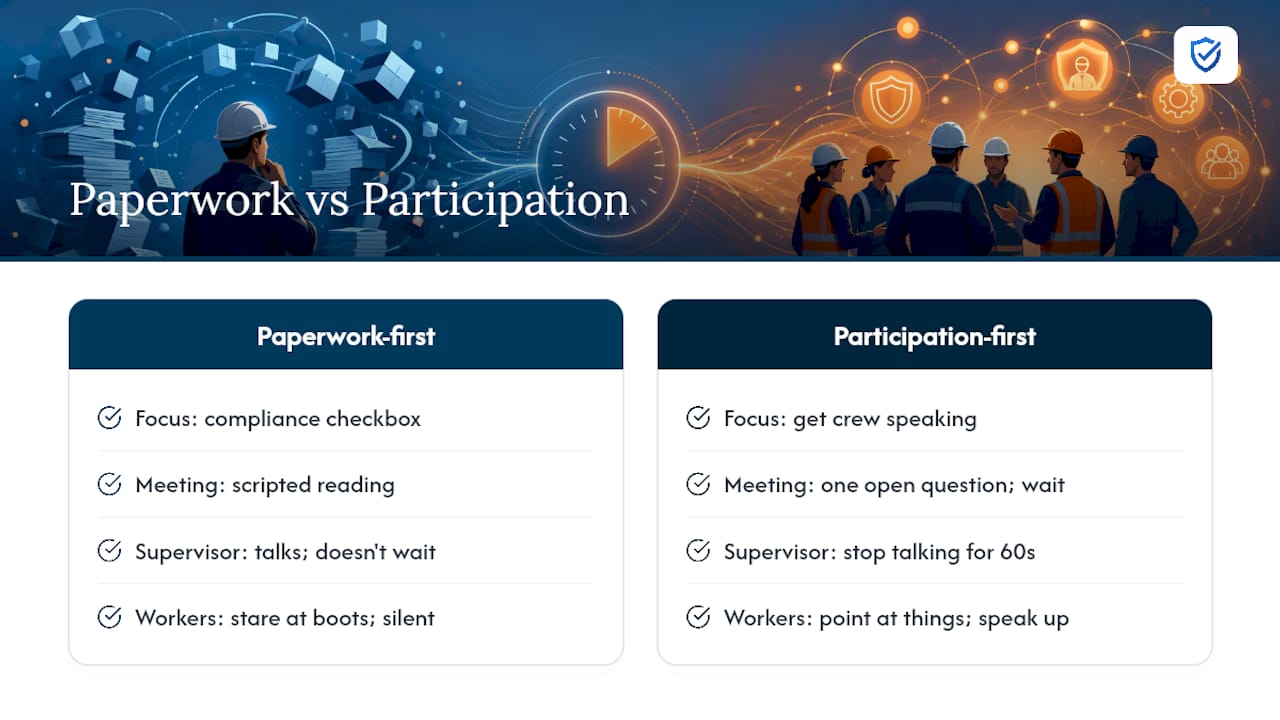
Three actions worth trying at your next meeting: ask one open-ended question and count to five before you answer it yourself, bring one visual from the actual site instead of a printed handout, and assign exactly one follow-up action out loud before anyone walks away.
The industry’s habit of treating toolbox talks as a compliance checkbox is backwards. The compliance record is a byproduct of a good meeting, not the point of it. Supervisors who chase the paperwork first end up with talks nobody remembers and folders nobody can search. Supervisors who chase participation first end up with both, a crew that speaks up and a record that holds up. The gap between those two outcomes isn’t skill or training budget. It’s whether the supervisor is willing to stop talking for sixty seconds and let someone else answer first.
“When workers participate actively in safety discussions, hazard retention skyrockets. MySafetySolution helps leaders ditch the generic script and facilitate interactive discussions with prompt questions and instant mobile sign-ins.”
— Matthew Hoffman, President - MySafetySolution
Where My Safety Solution Fits Into Your Meeting Routine
Every format and activity covered above still needs a paper trail behind it, and that’s the part most supervisors dread. My Safety Solution removes that friction by handling the administrative load your interactive meetings still generate, without changing how you actually run the room.
The platform’s library of 2,500+ talks, built on Cal/OSHA Title 8 and federal OSHA 29 CFR, means you’re not writing tomorrow’s talk from a blank page. Digital attendance capture replaces the clipboard with a timestamped, audit-ready record, and assignable checklists keep follow-up actions visible instead of buried in a notebook. For crews spread across multiple sites, recordkeeping scales to help manage workload efficiently. If you manage safety for a fleet or trucking operation, the trucking-specific tools map directly onto multi-site briefing needs. Start your 15-day free trial and see how much facilitation time you get back once the paperwork runs itself.
Sources
- Toolbox talks and tailored interventions — peer-reviewed review (PMC)
- Activities | Occupational Safety and Health Administration