
QR-code attendance can meet OSHA and NLTAPA compliance standards, but only when the system produces an auditable record tying each attendee’s identity to a session date, time, topic, and trainer. OSHA has repeatedly accepted electronic certification of training when the record identifies who was trained and when, and the employer can produce it on request. Format is not the issue. Integrity is.
A compliance-grade QR attendance record needs to capture:
- Attendee name or employee ID (not a shared or anonymous scan)
- Timestamp generated by the system, not entered manually
- Session topic or hazard discussed
- Trainer or presenter name
- An exportable audit log with timestamps that cannot be altered after the fact
Do not retire your paper sign-in sheets until a pilot proves your QR system can generate an inspector-ready export on demand. That single test tells you more about compliance readiness than any vendor’s feature list.
Key Takeaways
QR-code attendance meets OSHA and NLTAPA compliance when it captures verified identity, immutable timestamps, session topic, and trainer certification in an exportable audit log.
| Point | Details |
|---|---|
| OSHA accepts electronic records | Multiple interpretation letters confirm electronic certification and signature pads satisfy training documentation requirements. |
| Five fields are non-negotiable | Name/ID, timestamp, topic, trainer identity, and an exportable log form the compliance baseline. |
| Pilot before full cutover | Test QR attendance alongside paper for at least two weeks and simulate an inspection before retiring old sign-in sheets. |
| Retention baseline is for the length of an employee’s tenure plus a few additional years | No universal OSHA period exists for meeting sign-ins, so set a defensible internal policy. |
| My Safety Solution maps directly to the checklist | The platform offers employee-linked scans, offline mode, immutable audit exports, and AI-generated safety topics for construction, manufacturing, and utilities crews. |
Table of Contents
- How Does QR Code Sign-In Work for Safety Meetings?
- Does OSHA Accept Electronic Attendance Records?
- Implementation Checklist for Rolling Out QR Attendance
- What Safeguards Make a Digital Record Defensible?
- How Long Should You Keep QR Attendance Records?
- What Mistakes Undermine QR Attendance Compliance?
- When Does QR Attendance Make Sense, and When Doesn’t It?
- How My Safety Solution Handles Compliance-Grade QR Attendance
- Where to Verify OSHA Guidance on Electronic Records
- Sources
How Does QR Code Sign-In Work for Safety Meetings?
The workflow behind QR code safety attendance is simpler than most safety managers expect, and it starts before the meeting even begins.
- Generate a session. A supervisor or safety consultant creates a session inside the platform tied to a specific date, jobsite, and topic. The system produces a unique QR code for that session, not a generic, reusable one.
- Display the code. The code goes up on a jobsite whiteboard, a laminated sign near the gate, or a tailgate board where crews gather.
- Workers scan in. Each attendee scans with a phone camera, which logs their employee-linked identity and a server-generated timestamp. Higher-risk meetings can require an e-signature or a quick photo capture as an added layer.
- Records land in a secured database. Entries route into a database that produces an exportable audit report, formatted for internal review or a regulator’s request.
Jobsites without reliable signal are the real test of any QR code attendance system. A workflow that only functions with full bars is not a workflow, it is a liability waiting for a bad connection day. Look for offline mode that queues scans locally and syncs once connectivity returns, plus a printed backup sign-in sheet for the rare total outage.
Pro Tip: Run your first two weeks of QR attendance alongside a paper backup, not instead of one. It costs almost nothing and gives you a clean comparison if an auditor ever questions the transition.
Does OSHA Accept Electronic Attendance Records?
Yes, and the agency has said so multiple times, across multiple decades. OSHA’s own interpretation letters confirm that barcode and badge-swipe systems can document attendance, provided safeguards verify the ID actually belongs to the employee using it. A separate letter addressed electronic signature pads directly, stating OSHA has no objection to their use for training certification as long as the underlying certification requirements are still met.
Here is what an inspector actually checks against a QR export:
- Date the session occurred
- Attendees, by name or employee ID, not a headcount
- Topic discussed, specific enough to show hazard or task relevance
- Trainer or certifier identity, matched to the standard requiring that certification
The pattern across three separate interpretation letters spanning 1997, 2000, and 2014 is consistent: OSHA cares about content and accessibility, not whether the record is ink or a database entry.
Some standards still require a signed certification from the trainer specifically, separate from the attendee log. A QR system handles attendance well, but check the underlying standard before assuming the QR export replaces every signature requirement outright.
Implementation Checklist for Rolling Out QR Attendance
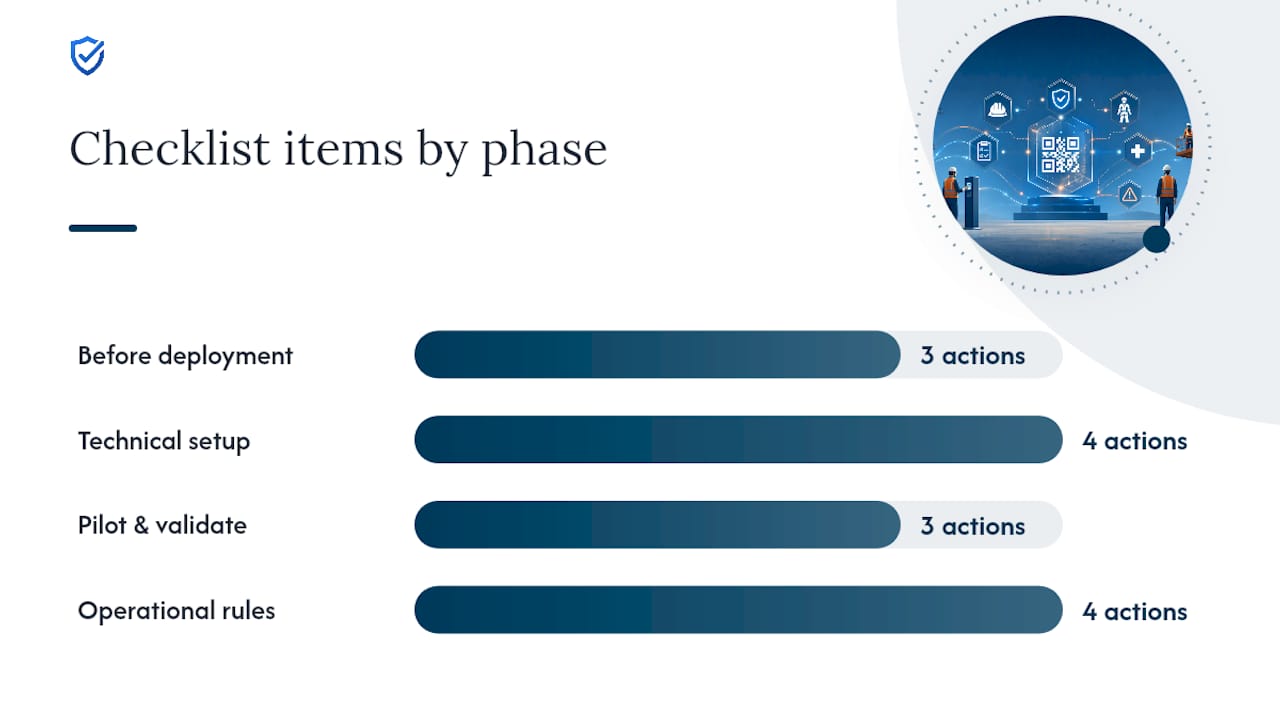
Rolling out QR code attendance across a jobsite works best as a staged process, not a single flip of a switch.
Before deployment:
- Loop in legal, HR, and any union representatives before writing a single line of policy.
- Define your retention policy and lock in the required data fields up front, not after your first incident review.
- Confirm which state OSHA plan governs your site. Oregon, for example, prescribes specific meeting minute contents beyond federal baseline requirements.
Technical setup:
- Generate a fresh, session-specific QR code for every meeting.
- Enforce employee-linked scans through one-time enrollment rather than open, anonymous links.
- Post signage at eye level near gathering points, and test signage placement in direct sunlight, a real problem on outdoor sites.
- Enable offline capture for low-signal areas.
Pilot and validate: 4. Run a two-to-four-week pilot on one crew or one shift. 5. Export a sample audit report and simulate a real inspection walkthrough with your safety team. 6. Adjust verification steps based on what breaks. Something always breaks in the first pilot.
Operational rules:
- Set a clear policy for late arrivals joining a session.
- Decide how contractors and visitors scan in, since they may not exist in your employee roster.
- Build an escalation path for scans that fail verification. Someone needs to own that exception, not ignore it.
Pro Tip: Treat your pilot export like a dress rehearsal for a real OSHA visit. If your safety team can’t explain a single row on that report in under ten seconds, fix the workflow before you scale it.
What Safeguards Make a Digital Record Defensible?
An auditable QR attendance record is only as strong as the safeguards behind the scan itself, and this is where most weak implementations fail.
- Employee-linked identifiers. Require a one-time enrollment tying employee ID to a mobile number rather than trusting whoever happens to hold the phone. Device possession alone proves nothing, since phones get shared, borrowed, and lost.
- Immutable audit logs. Timestamps should generate server-side, not from a device clock a worker controls. Exports should be write-once, with any later change captured in an append-only history rather than overwriting the original entry.
- Access and permissions. Restrict who can edit a record after the fact. Disputed entries should route to a supervisor for confirmation, not get silently corrected by whoever notices first.
- Optional signature or photo capture. For higher-risk topics like confined space entry or fall protection, an added signature or photo raises the evidentiary bar without slowing the line at the whiteboard.
Pro Tip: If your system lets anyone with admin access quietly edit a past attendance entry with no trace, you don’t have an audit trail. You have a spreadsheet with better branding.
How Long Should You Keep QR Attendance Records?
OSHA does not set one universal retention period covering every safety meeting sign-in, which leaves employers to set a defensible internal standard. A practical baseline is keeping meeting records for the length of an employee’s tenure plus three years, long enough to cover most claims and complaints that surface after someone has left.
When preparing for an audit, three export formats do the heavy lifting:
- PDF meeting packets combining session details and the full attendee list in one document
- Timestamped CSVs for anyone doing a deeper data review or cross-referencing against payroll
- Trainer certification records, kept separately from attendance, since some standards require that signature independent of the attendee log
Where your QR data intersects with OSHA’s electronic submission requirements for Form 300, 300A, or 301, keep summary reports on hand for quick review and raw logs available only when someone specifically asks for them. Inspectors want the packet first, not the database dump.
What Mistakes Undermine QR Attendance Compliance?
A handful of avoidable mistakes turn an otherwise solid QR system into a liability during an audit.
- Anonymous session links that anyone can scan without identity verification defeat the entire purpose of the system.
- Shared credentials or shared devices make it impossible to prove who actually attended.
- Missing topic or trainer fields leave a record that shows someone was present but not what they learned or from whom.
- No retention indexing turns your archive into a pile nobody can search when it matters most.
The fix for all four is the same: make required fields mandatory at the point of entry, not optional after the fact, and back it up with periodic supervisor spot-checks.
When Does QR Attendance Make Sense, and When Doesn’t It?
QR attendance shines on mobile-first crews running frequent, short safety talks where centralized records matter more than paperwork ceremony. A construction crew doing on-site metal panel installation benefits from the speed just as much as a warehouse team running daily tailgates.

Hybrid approaches earn their place on sites with limited device access, strict union documentation rules, or heavy contractor turnover where enrollment lags behind the workforce. My Safety Solution customers report cleaner audit exports once QR replaces clipboard chaos, but no digital system replaces judgment about when paper still belongs in the mix.
How My Safety Solution Handles Compliance-Grade QR Attendance
My Safety Solution is built around the exact checklist this article just walked through: audit logs with immutable timestamps, employee-linked scans instead of anonymous links, offline capture for low-signal jobsites, and exportable, inspector-ready reports your team can hand over without scrambling.

The platform’s AI-powered topic generation also solves a problem QR attendance alone doesn’t touch: keeping the content of your tailgates relevant, so the “topic discussed” field on every export actually reflects a hazard your crew needed to hear about. Combined with NLTAPA-aligned content along with role-based permissions for consultants, managers, and workers, the system covers both the record and the meeting behind it.
If you manage safety across construction, manufacturing, warehousing, or utilities crews, the next step is straightforward: request a walkthrough of My Safety Solution and ask for a sample compliance export before you commit to anything. Seeing the actual report an inspector would receive tells you more in five minutes than any feature comparison.
Where to Verify OSHA Guidance on Electronic Records
- Electronic Certification of Training: OSHA’s 2014 letter on accepting electronic training records.
- Electronic Recordkeeping of Training Records: The 1997 letter addressing badge and barcode systems.
- Electronic Signature Pads for Training Certification: The 2000 letter on signature pad acceptance.
- OSHA Electronic Submission Guidance: Current rules for submitting injury and illness data electronically.
Sources
- Electronic Certification of Training | Occupational Safety and Health Administration
- Electronic recordkeeping of employee safety training records. | Occupational Safety and Health Administration
- Use of electronic signature pad to record signatures for training certification. | Occupational Safety and Health Administration
- OSHA Injury and Illness electronic submission guidance