
An audit-ready offline safety meeting record always proves who was there, what was said, when and where it happened, and what follow-up got assigned. That is the whole test. If a record cannot answer those four questions on its own, without someone’s memory filling the gaps, it will not hold up during an inspection.
Building that record does not require complicated systems. It requires a consistent template and enough discipline to fill it out the same way every time, whether you’re working from a clipboard or a tablet.
Same-day checklist:
- Date, start/end time, location, and project code
- Facilitator name and role
- Attendee list with signatures or verified ID numbers
- Topic covered and a short summary (2 to 5 bullets)
- Any incidents, near misses, or safety concerns raised
- Action items with a named owner and due date
Use a standard template every time, whether it’s a paper form or an offline-capable app that autosaves and timestamps entries locally before syncing.
Key Takeaways
An audit-ready offline safety meeting record proves attendance, content, and follow-up through consistent templates, disciplined naming, and a verifiable capture method, whether paper or offline-first digital.
| Point | Details |
|---|---|
| Standardize every field | Use the same header, attendance, content, and action-item fields on every record, paper or digital. |
| Fix illegible signatures early | Assign employee ID numbers or use supervisor-verified rosters when handwriting is inconsistent. |
| Name and file consistently | Use a fixed naming convention like YYYYMMDD_projectcode_site_meetingtype_facilitator.pdf for fast retrieval. |
| Correct errors visibly | Strike through mistakes with a single line, initial, and date the change instead of using correction fluid. |
| Consider My Safety Solution for offline sync | The platform autosaves locally and syncs automatically once devices reconnect, closing the gap paper and partial-offline apps leave open. |
Table of Contents
- What to Include in a Safety Meeting Record
- Offline Capture Methods: Disciplined Paper Best Practices
- Offline-Capable Digital Workflows: Preserving the Audit Trail
- Organizing, Naming, and Storing Records for Audit Retrieval
- Retention and Audit Readiness: How Long to Keep Records
- Copy-Ready Templates for Sign-In Sheets and Minutes
- A Pilot Playbook for Offline-First Field Documentation
- Best Practices for Keeping Paper Records Confidential and Secure
- Protocols for Correcting or Amending Errors in Offline Records
- Training Staff to Complete and Manage Offline Documentation
- Disaster Recovery Strategies for Physical Safety Records
- Editorial Take: Why the Template Matters More Than the Tool
- Get Audit-Ready Records Without the Paperwork Backlog
- Frequently Asked Questions
- Sources
What to Include in a Safety Meeting Record
Every field on a safety meeting record exists because an auditor, OSHA inspector, or plaintiff’s attorney will eventually ask a specific question, and the record has to answer it without anyone’s testimony filling the gap.
Start with the header: date, start and end time, location, project code, and facilitator name. This establishes when and where the meeting happened and who ran it. Next comes attendance: printed name, employer (critical on multi-employer job sites), a signature or a verifiable ID number, and position or role. Loose sign-in sheets with illegible scrawls are one of the most common weak points auditors flag.
The content section covers the topic discussed, a concise summary of two to five bullet points, any incident or near-miss notes raised during the meeting, and decisions made. Long-form transcripts are not the goal. Audit readiness favors concise, consistent records that prove coverage and attendance over verbatim minutes nobody will read again.
Finally, track actions: the specific task, a named owner, a target date, and a status field showing whether it closed out or carried over from a prior meeting.
- Header fields prove the meeting actually occurred at a specific time and place
- Attendance fields prove who received the safety information
- Content fields prove what was communicated, not just that “a meeting happened”
- Action fields prove hazards got addressed, not just discussed
Pro Tip: If your action-item tracker shows the same open item three meetings in a row with no movement, that is not a documentation problem. That is a signal to escalate the hazard before it becomes an incident.
Offline Capture Methods: Disciplined Paper Best Practices
Paper still works when it’s treated like a controlled document instead of a scrap on a clipboard. The discipline is in the routine, not the material.
- Standardize the sign-in sheet. Use one layout across every crew and every site: date, employer column (essential for multi-employer sites), printed name, signature, and role.
- Solve the illegible-signature problem before it happens. Assign employee ID numbers or use foreman-verified rosters when handwriting is inconsistent. A supervisor initialing next to a hard-to-read name closes the gap.
- Add photo evidence. A timestamped crew photo alongside a supervisor attestation gives you a second, independent proof point that the meeting happened as recorded.
- Log the chain of custody. Note who carried the paper from field to office and when, especially on multi-day projects where sheets pass through several hands.
- Scan daily, not weekly. Set the scanner to PDF at 300 DPI, and upload the same day using a consistent file name.
Pro Tip: Keep a small three-ring binder in the site trailer purely for scanned confirmations. If a laptop dies or a drive corrupts, you still have a physical backup of what was uploaded and when.
Offline-Capable Digital Workflows: Preserving the Audit Trail
Paper works, but a well-built offline app removes the scanning step and the chain-of-custody guesswork entirely, as long as it’s built correctly.
The features that actually matter: local autosave that captures every entry the moment it’s typed, timestamped signatures tied to a specific device or user ID, offline media capture for photos and notes, and a sync process that logs exactly when each record uploaded and from which device. Offline-first apps save data locally and sync automatically once a connection returns, which prevents the lost-record problem common in dead zones on job sites, warehouses, and rural utility routes.
A synced record should be verifiable after the fact: an exportable PDF carrying metadata, a sync log showing the upload timestamp and device ID, and ideally a checksum or version history that flags if anything changed post-sync.
- Local autosave (not “save on submit”)
- Timestamped, device-linked signatures
- Offline photo and note capture
- Sync logs with upload timestamp and device ID
- Exportable PDF retaining all metadata
An offline-first design that autosaves and syncs deterministically reduces lost-data risk in isolated zones more reliably than apps relying on partial caching. Train supervisors to confirm a green sync status before leaving site, and spot-check exports weekly against the meeting schedule.
Organizing, Naming, and Storing Records for Audit Retrieval
An auditor asking for “every toolbox talk from the North Yard project in March” should get an answer in minutes, not an afternoon of digging through boxes.
Adopt a consistent file name across every record: YYYYMMDD_projectcode_site_meetingtype_facilitator.pdf. For example: 20260312_PRJ4471_NorthYard_ToolboxTalk_Rodriguez.pdf. Anyone on the team can find or file a record correctly without asking what convention to use.
Structure folders by year, then project, then meeting type. A simple index spreadsheet listing date, project, facilitator, and attendee count lets you filter and pull records without opening a single PDF.
- File name: date, project code, site, meeting type, facilitator
- Folder path: year → project → meeting type
- Index fields: date, facilitator, attendee count, topic, linked incident number (if any)
- Cross-reference meeting records to related incident reports, inspections, and training transcripts using the project code as the shared key
That last point matters more than it looks. When an inspector asks whether a specific hazard was communicated before an incident, the project code should let you pull the meeting record and the incident report side by side in seconds.
Retention and Audit Readiness: How Long to Keep Records
OSHA does not publish a single mandated retention period for toolbox talk minutes, but it does expect proof that training happened whenever a standard requires it. OSHA’s safety-management guidance confirms there’s no prescribed template, which means the burden falls on you to keep something defensible.
A widely used baseline, reflected in published minutes templates, is to retain meeting records for at least one year. Many safety managers keep training-related records three years or longer since they double as evidence of ongoing hazard communication, and incident-adjacent records should be retained as long as the underlying incident file stays open.
Audit bundle checklist:
- Signed sign-in sheets for the relevant period
- Meeting minutes with topic and summary
- Action-item tracker showing closure status
- Any related incident or near-miss reports
- Export instructions or index sheet for quick retrieval
If a record went missing, don’t leave a blank spot. Document the gap with a signed affidavit from the facilitator, a supervisor’s contemporaneous notes, or corrective evidence showing the topic was covered elsewhere.
Pro Tip: Never backdate a reconstructed record. Note the actual date of reconstruction and reference the original meeting date. Auditors trust a transparent gap far more than a suspiciously perfect file.
Copy-Ready Templates for Sign-In Sheets and Minutes
Three templates cover almost every offline safety meeting scenario: sign-in sheets, toolbox talk minutes, and committee minutes.
Sign-in sheet columns: Date | Project Code | Printed Name | Employer | Signature | Role. Add a “Verified By” column if legibility is a recurring problem on your crews.
Toolbox talk minutes: Header (date, time, location, facilitator) → 3 to 5 bullet summary of the topic → action row (task, owner, due date). Keep it to one page.
Committee minutes follow the format OSHA itself illustrates in its safety committee meeting minutes example: agenda, incident/near-miss review, and an action tracker.
| Committee Minutes Element | What It Captures |
|---|---|
| Agenda | Topics scheduled for discussion that meeting |
| Incident/near-miss review | Summary of any events since last meeting |
| Action tracker | Task, owner, due date, and status |
| Previous minutes review | Confirmation prior action items closed or carried forward |
A Pilot Playbook for Offline-First Field Documentation
The fastest way to test whether an offline digital workflow fits your operation is a two-week pilot with one crew, not a company-wide rollout.
Pick one crew and enable mobile devices for that group only. Have them capture toolbox talks using offline mode, whether or not the site has signal, and sync automatically at the end of each shift. Verify the exported PDF, sync log, and signature metadata the next morning before the crew heads back out.
- Choose one crew and one project for the pilot
- Enable offline capture on mobile devices, no signal required
- Sync at shift end and confirm the export the following morning
- Track time-to-record, missing-signature rate, and audit retrieval time across the two weeks
Field teams using structured safety meeting logging apps with offline capture report faster crew sign-ins and exportable PDFs that prove attendance without depending on signal strength. That combination of speed and defensibility is exactly what a pilot should measure.
My Safety Solution’s platform is built around this exact workflow: mobile-enabled meeting capture designed for crews that lose signal regularly but still need audit-ready exports at the end of the day.
Best Practices for Keeping Paper Records Confidential and Secure
Paper safety records contain names, signatures, and sometimes health-adjacent notes from incident discussions, which makes them sensitive documents, not just administrative paperwork.
Store active binders in a locked cabinet or drawer in the site trailer or office, not on an open desk where any visitor can flip through them. Limit access to supervisors, safety managers, and HR staff who have a legitimate reason to review the file. If subcontractor employees appear on your sign-in sheets, be mindful that their personal information (full name, sometimes an ID number) is now sitting in your files too, so treat cross-employer sheets with the same care you’d apply to your own payroll records.
When records move from the field to a central office, use a sealed folder or envelope rather than loose sheets in a truck cab. That single step prevents pages from scattering, getting soaked, or ending up in someone else’s paperwork by accident.

For long-term archives, a locked file room with restricted key access beats a general storage closet every time. If you scan records for backup, apply the same access control digitally: password-protect shared drives and limit editing rights to the safety team, so a scanned PDF doesn’t become more exposed than the paper it replaced.
Destroy expired records properly once retention periods lapse. Shredding, not simply discarding, keeps old sign-in sheets with names and signatures from ending up in a dumpster where anyone can retrieve them.
Protocols for Correcting or Amending Errors in Offline Records
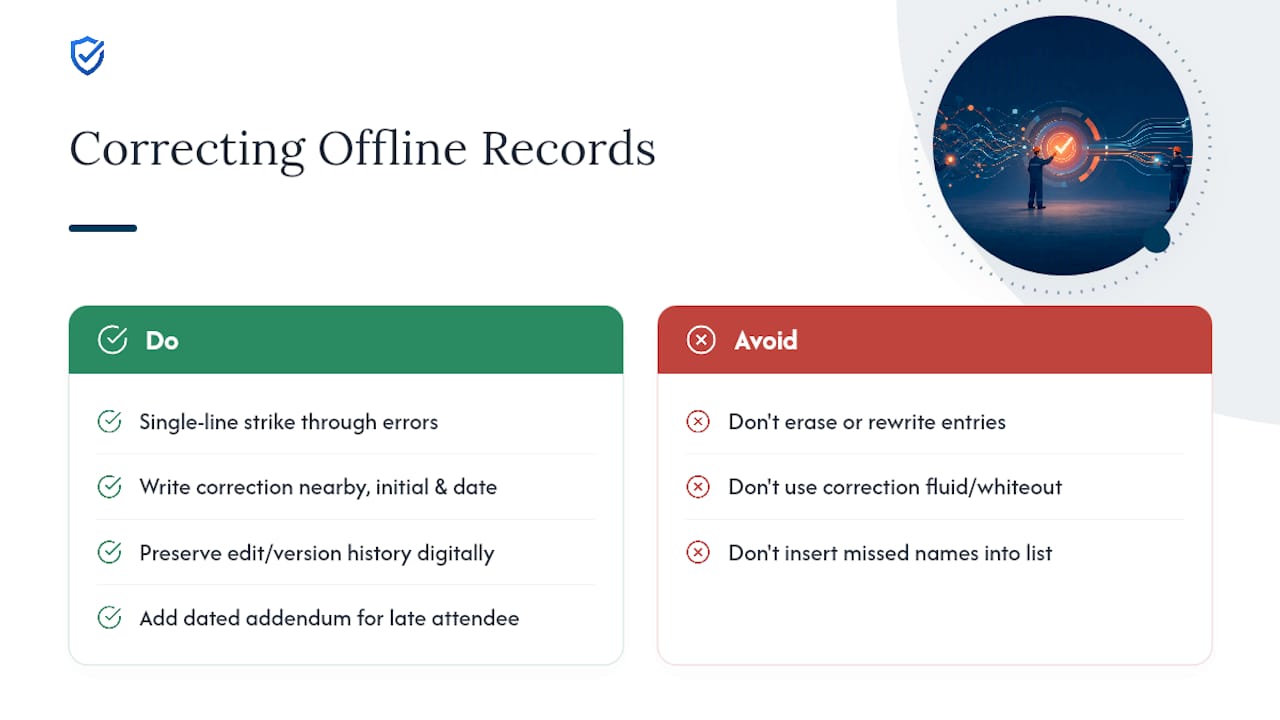
Mistakes happen: a wrong date, a misspelled name, a forgotten attendee added after the fact. The fix is never to erase and rewrite. It’s to correct visibly and explain why.
For paper records, draw a single line through the incorrect entry so the original text stays legible, write the correction beside or above it, then initial and date the change. This single-line-strikethrough method is standard across regulated documentation for a reason: it shows exactly what changed, who changed it, and when, without raising suspicion that something got hidden.
Never use correction fluid or fully black out an entry. An auditor who sees whiteout on a safety record will assume the worst, even when the original mistake was harmless. A visible, initialed correction reads as honest recordkeeping. A blacked-out line reads as concealment.
For digital records, the same principle applies through version history. A properly built offline app should preserve the original entry and log the edit as a separate, timestamped event rather than overwriting the field silently. If your platform doesn’t retain edit history, treat that as a gap worth fixing before your next audit.
If an attendee was left off a sign-in sheet and needs to be added later, don’t insert their name into the original list. Add a dated addendum note explaining who was missed, why, and how you confirmed their attendance, whether through a supervisor’s recollection, a photo, or a separate acknowledgment they sign afterward.
Set a simple rule across your team: any correction gets initialed by the person who made it and, where possible, countersigned by a supervisor. That two-person visibility is what turns a correction from a liability into a non-issue.
Training Staff to Complete and Manage Offline Documentation
A perfect template does nothing if the person filling it out doesn’t know what “complete” looks like. Most documentation gaps trace back to inconsistent training, not bad intentions.
Start every new facilitator with a short walkthrough of the actual form they’ll use, whether that’s a paper toolbox talk sheet or a mobile app screen. Show them a real, filled-out example, not a blank template, so they can see what a properly summarized topic and a specific action item actually look like versus a vague one.
Make legibility and completeness part of a facilitator’s job, not an afterthought. A five-minute checklist review before ending each meeting, confirming every attendee signed, the topic summary is filled in, and any action items have a named owner, catches most gaps before the paperwork ever leaves the site.
Run a short refresher for supervisors every few months focused specifically on documentation, separate from general safety training. Include real examples of what auditors have flagged in the past: illegible names, missing dates, action items with no owner. Concrete examples stick better than a generic reminder to “fill out the form correctly.”
If your team uses an offline-capable app, train supervisors specifically on confirming sync status before leaving the site. A record captured perfectly in the field but never synced is functionally the same as a record that never existed.
- Walk new facilitators through a real, completed example before their first meeting
- Add a five-minute completeness check to the end of every meeting routine
- Run quarterly documentation refreshers using real, anonymized examples of past gaps
- Confirm sync status is part of supervisor training, not an assumption
Disaster Recovery Strategies for Physical Safety Records
A flood, fire, or burst pipe can wipe out years of paper safety documentation in an afternoon, and most sites only think about this after it happens.
Store active paper records above ground level, away from windows, sprinkler heads, and any area prone to water intrusion. A metal filing cabinet resists fire longer than a cardboard box, and a fire-rated document safe is worth the cost for records tied to open incident investigations or long-term training compliance.
The single most effective disaster recovery step is also the simplest: scan every record and store the digital copy somewhere physically separate from the paper original, ideally a cloud drive or an off-site server rather than a second copy in the same building. If the site trailer burns down, a scanned backup sitting on a laptop in that same trailer offers no protection at all.
Set a recurring scanning schedule rather than treating it as optional. Daily scanning, discussed earlier for audit retrieval, doubles as your disaster recovery plan. There’s no separate system to maintain.
For sites in flood-prone or wildfire-adjacent regions, consider keeping a rotating set of paper originals off-site, at a company headquarters or a bank safety deposit box, once a project closes out and records move into long-term retention. Active job-site files still need to be on hand, but archived records don’t need to sit in the same building indefinitely.
Finally, build the recovery routine into onboarding. New site supervisors should know where the fire-rated cabinet is, how often scanning happens, and where the digital backups live, before they ever need that information under pressure.
Editorial Take: Why the Template Matters More Than the Tool
Most advice on this topic obsesses over the paper-versus-digital debate as if one format is inherently more defensible than the other. It isn’t. A meticulously scanned paper trail with consistent naming beats a sloppy app rollout every time, and a disciplined offline app beats a shoebox of loose sign-in sheets every time. The format is not the variable that determines audit readiness. Consistency is.
What the conventional advice gets wrong is treating retention periods as the finish line. A record that survives three years in a locked cabinet but can’t be located within ten minutes during an inspection has already failed the practical test, even if it technically exists. Auditors don’t reward hoarding. They reward retrieval speed and completeness.
If you take one thing from this playbook, prioritize the naming convention and the folder structure before you touch anything else. A team that files consistently from day one rarely has a records crisis. A team that fixes filing after the fact spends months untangling a backlog nobody wanted to create.
Get Audit-Ready Records Without the Paperwork Backlog
My Safety Solution replaces the scanning routine and the manual sync checks with a system built specifically for crews that lose signal on the job: capture happens offline, autosaves locally, and syncs automatically the moment a device reconnects, so no toolbox talk gets lost to a dead zone in a warehouse or a rural utility corridor.

If you’ve been following the paper checklist in this article, from standardized sign-in sheets to daily scanning routines, you already know how much time that discipline consumes every week. My Safety Solution’s mobile-enabled compliance platform automates the parts that eat that time: timestamped signatures, exportable audit-ready PDFs, and a compliance dashboard that shows exactly which crews have gaps before an inspector ever asks. Construction teams get purpose-built workflows, and utility crews get industry-specific tracking suited to distributed, low-connectivity worksites.
Start a trial with one crew this week and compare your current retrieval time against what an automated export delivers.
Frequently Asked Questions
What is the minimum information an offline safety meeting record must include? At minimum: date, time, location, facilitator, attendee names with signatures, a summary of the topic covered, and any action items with an assigned owner and due date. Missing any of these weakens the record’s value in an audit and should be avoided to maintain documentation integrity.
How long should I keep offline safety meeting records? A common baseline is at least one year, reflected in published minutes templates, though many safety managers retain training-related records three years or more since OSHA requires proof of training without specifying a set period.
Does OSHA require a specific safety meeting minutes template? No. OSHA’s safety-management guidance confirms there is no single mandated form, but it does expect documentation proving that required training and hazard communication actually took place.
Can I fix a mistake on a paper safety meeting record? Yes. Draw a single line through the error, write the correction next to it, then initial and date the change. Never use correction fluid or black out the original entry, since that reads as concealment during an audit.
What’s the safest way to back up physical safety meeting records? Scan every record daily and store the digital copy in a location physically separate from the paper original, ideally an off-site server or cloud drive, so a fire or flood at the job site doesn’t destroy both copies at once.
Sources
- Safety management | Occupational Safety and Health Administration
- All-hazards meeting minutes template | Clover Park Technical College (CPTC)
- Free safety meeting templates | Safety Evolution