
Construction document control, in this context, means running toolbox talks and job briefings, capturing signed and timestamped attendance, and filing OSHA-compliant records where they can be retrieved fast. The single most important habit: after every meeting, log the specific topic, collect signatures, timestamp the entry, and store it somewhere searchable. OSHA and platforms like My Safety Solution both offer templates and automation to make that habit stick.
TL;DR:
- Accurate and detailed meeting records must include date, location, topic, signatures, attendance, and corrective actions to be OSHA-compliant and defendable.
- Toolbox talks should only take a few minutes and focus on specific hazards relevant to the day’s tasks, with signatures collected immediately.
- Digital records with GPS tags, photos, and tamper-proof logs ensure better compliance and quick audit readiness compared to paper sign-in sheets.
- Records should be retained for at least three years, organized per project with searchable metadata, to facilitate fast retrieval during inspections.
- Tracking key KPIs such as completed meetings, attendance rates, and incident trends keeps safety programs effective and helps identify areas needing improvement.
Table of Contents
- What Belongs in Every Construction Document Control Record
- How Should You Run and Document Toolbox Talks?
- Record Retention: What to Keep and How Long
- Which Digital Features Turn Paperwork Into Evidence?
- What KPIs Prove Your Safety Meeting Program Works
- What the Field Actually Teaches About Documentation
- Automating Construction Document Control With My Safety Solution
- Where to Find Templates and Official Guidance
- Sources
What Belongs in Every Construction Document Control Record
A meeting record that survives an inspection has to answer the same six questions every time: who, what, where, when, why, and what happens next. Skip one field and the record becomes a liability instead of an asset.
The fields that matter most: date, time, and location; the specific topic (not “safety talk,” but “fall protection anchor points on the north scaffold”); presenter’s printed name and signature; each attendee’s printed name and signature; duration of the meeting; materials handed out; a space for questions or concerns raised; and corrective actions with a named owner and a deadline. This structure lines up with the documentation elements published safety-meeting guidance outlines for defensible safety meeting records.
Vague topic wording is one of the fastest ways to lose an argument during a citation dispute. “General safety” tells an inspector nothing about what was actually communicated. “Trenching hazards, spoil pile placement, and competent person sign-off procedure” tells them everything. Handwritten signatures matter for the same reason: a typed name on a spreadsheet is easy to dispute after the fact, while a signature tied to a specific date carries more weight in an audit trail.
A five-minute toolbox talk needs only a simple sign-in sheet: date, topic line, and a signature column. A formal monthly safety meeting needs the full record: agenda, presenter notes, attendance, and a corrective-action log.
- Toolbox talk: date, topic, presenter, attendee signatures, duration
- Formal meeting: full agenda, presenter notes, attendee signatures, materials list, corrective actions with owners and deadlines
- Incident-driven briefing: date, trigger event, revised procedure, signatures, follow-up inspection date
Pro Tip: Write the topic line the way you’d want it read back to you in a deposition. If it wouldn’t hold up out loud, rewrite it before the meeting starts.
How Should You Run and Document Toolbox Talks?
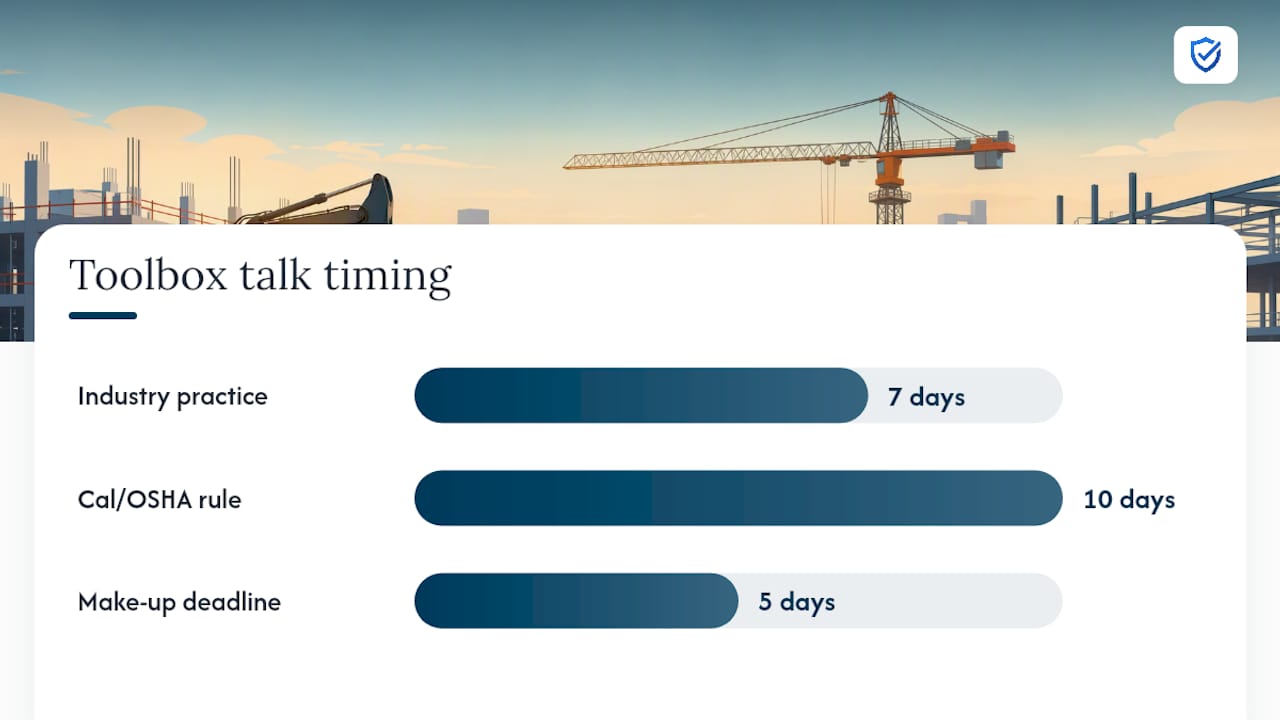
OSHA’s construction standard spells out what a job briefing must cover and when it must happen. 29 CFR 1926.952 requires the briefing to address hazards associated with the job, the work procedures involved, special precautions, energy-source controls, and required personal protective equipment. That briefing has to happen at least once before the first job of the day or shift, and again whenever conditions change enough to introduce new hazards.
Federal OSHA doesn’t mandate a fixed weekly cadence, but the construction industry treats weekly toolbox talks as the practical floor, and some state plans go further. Cal/OSHA, for instance, requires meetings every 10 working days on many jobs. Follow this sequence for consistent coverage:
- Confirm the day’s task list before the crew starts and match the briefing topic to the actual work, not a generic rotation.
- Run the briefing on site, at the point of work, so hazards can be pointed at directly.
- Collect signatures immediately, not at the end of the week when memory has faded.
- Flag any worker who missed the briefing and schedule make-up training within five business days.
- Have a supervisor or the original presenter deliver the make-up session, using the same topic content, and log the completion date alongside the original record.
A foreman’s job safety checklist is useful here, since foremen are usually the ones running these briefings and need a repeatable process that doesn’t depend on memory. Missed briefings that never get made up are one of the most common gaps auditors flag, and they’re also the easiest to fix once someone owns the make-up workflow.
Record Retention: What to Keep and How Long
Keep training and meeting records for at least three years as a baseline. Some exposure and health-related records carry longer retention windows under specific standards, so check whether your work involves substances or conditions that trigger extended retention before you set a blanket policy.
Organization matters as much as duration. A single shared drive with inconsistent file names doesn’t hold up when a general contractor or inspector asks for records on short notice. Set up per-project folders with searchable metadata (project name, date range, topic) and maintain a central archive for crews that move between sites, so nobody has to hunt through a foreman’s truck for last month’s sign-in sheets.
When an inspector or GC requests documentation, you want an audit packet ready in minutes, not days. Build it once and reuse the format:
- Signed PDFs of every meeting record for the requested period
- A running list of topics covered, sorted by date
- The corrective-action log with closure status and dates
- Attendance summary showing completion rate across the crew
- Any make-up training completions tied to the original missed session
Documented meetings also feed into contractor prequalification and certification programs like COR and VPP, which score meeting documentation as part of the review. A clean audit packet isn’t just defense against a citation. It’s a competitive asset when you’re bidding against contractors who can’t produce one as fast.
Which Digital Features Turn Paperwork Into Evidence?
Paper sign-in sheets get lost, smudged, or left in a truck. Digital records solve a different problem: they create a timestamped, tamper-resistant trail that holds up under scrutiny.
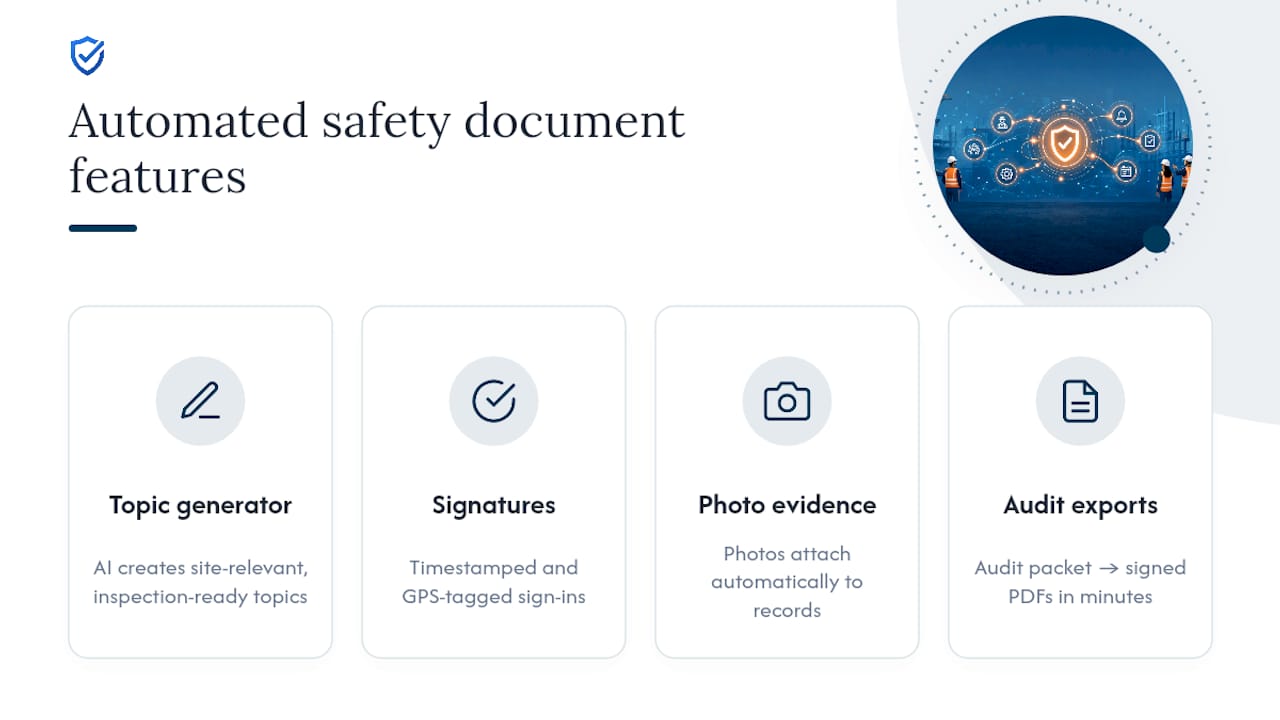
The features that matter most for construction document control: timestamped and GPS-tagged signature capture, photo attachments showing the briefing location or hazard, exportable signed PDFs for audits, immutable audit logs that show who edited what and when, offline mode for sites without reliable signal, preloaded topic libraries informed by OSHA and NLTAPA standards, built-in make-up training workflows, and centralized reporting across multiple projects.
Each feature maps to a specific inspection requirement. GPS and photo evidence tied to an attendance record proves a traveling crew was actually at the site named in the log, which matters when a company runs multiple projects at once. Timestamped, GPS-tagged attendance and AI-generated topic content close the documentation gaps that paper systems create for multi-site crews, and exportable signed PDFs mean an audit packet is one click away instead of an afternoon of scanning.
Before approving a tool, run it through a short checklist: Can you export your own data without vendor lock-in? Can admins set role-based permissions so field workers can’t edit past records? Is the audit log visible to a safety manager without a support ticket? A platform like My Safety Solution is built around exactly these requirements for high-risk, deskless crews.
What KPIs Prove Your Safety Meeting Program Works
A handful of well-chosen metrics tell you more than a dashboard full of noise. Track scheduled versus completed meeting rate, attendance completion rate, the percentage of make-up sessions finished on time, the number of open corrective actions and their average closure time, and incident or near-miss trends mapped against the topics covered in recent meetings.
OSHA’s own guidance points toward tracking indicators like training completions and responsiveness to reported hazards as part of evaluating program performance. You don’t need a dedicated analyst to gather these. Meeting exports and attendance logs already contain the raw data. Pull them monthly and the KPIs calculate themselves.
A one-page dashboard for a safety manager should show: meetings scheduled vs. completed this month, attendance rate by crew, make-up completions still outstanding, open corrective actions by age, and any incident trend tied to a recent topic gap.
Pro Tip: If your corrective-action closure time keeps climbing, the problem usually isn’t the crew. It’s that nobody assigned a deadline in the first place.
What the Field Actually Teaches About Documentation
Speed and defensibility aren’t opposites. A five-minute toolbox talk with a clear topic and clean signatures beats a thirty-minute meeting nobody remembers by Friday. Inspectors consistently favor concise, hazard-focused briefings with immediate documentation over long sessions that wander.
The fix crews respond to isn’t more paperwork. It’s less friction: shorter topics, faster sign-in, and a supervisor who follows up on corrective actions instead of letting them sit. Get workers talking during the briefing, not just signing at the end, and the documentation becomes a byproduct of a real conversation instead of a box to check.
“Lost sign-in sheets and scattered binders are an invitation to OSHA penalties. MySafetySolution provides centralized digital document control, turning chaotic field paperwork into a searchable, permanent audit trail.”
— Matthew Hoffman, President - MySafetySolution
Automating Construction Document Control With My Safety Solution
Every checklist item above, from signature capture to make-up tracking, is exactly what My Safety Solution was built to automate. The platform replaces the patchwork of spreadsheets and paper sign-in sheets that most safety teams patch together, and it does it without adding another task to a supervisor’s already full day.

The AI-powered topic generator produces specific, site-relevant content instead of generic filler, so your topic line is already inspection-ready before the meeting starts. Signatures come in timestamped and GPS-tagged, photo evidence attaches automatically, and make-up training workflows track who missed a session and when they completed it. When a GC or inspector asks for records, the audit packet exports as signed PDFs in minutes, not an afternoon of digging through a project folder.
Safety teams using the platform report fewer administrative hours spent chasing paperwork and stronger records to show corrective-action closure during reviews. If your current process depends on someone remembering to file a spreadsheet, it’s worth seeing how My Safety Solution handles construction document control for crews that can’t afford a gap in the record.
Where to Find Templates and Official Guidance
For the regulatory baseline, start with OSHA’s job briefing standard and its recommended practices guide, which includes free consultation resources for high-hazard worksites. My Safety Solution’s safety meeting software overview includes sign-in sheet templates and toolbox talk scripts ready to adapt for your crew.
Sources
- 1926.952 - Job briefing. | Occupational Safety and Health Administration
- How to conduct a safety meeting and document it properly