
A compliant driver safety meeting log captures date and time, topic, presenter, attendee signatures or verified e-signatures, and any corrective actions, then stores those records centrally in a searchable audit trail. Keep meetings short (10 to 20 minutes), tie each one to a specific hazard or compliance update, and log it the same day. That combination, brief and consistent over time, is what auditors are actually screening for.
TL;DR:
- Maintaining digital, timestamped records with verified signatures and linked corrective actions ensures faster auditor responses and reduces record loss.
- Keeping logs for at least three years and organizing them by driver, date, and topic provides comprehensive audit-ready documentation during inspections.
- Short, focused meetings of 10 to 15 minutes around specific hazards with signed attendance proof are more effective than longer, distracted sessions.
- Linking each safety issue directly to an assigned corrective action with a deadline creates a clear, verifiable safety improvement trail.
- Automated solutions streamline record capture, storage, and report generation, minimizing clerical errors and making audit preparation more efficient.
Table of Contents
- What to Include in Every Driver Safety Meeting Log
- Ready-To-Use Templates for Sign-In Sheets and Meeting Notes
- How to Run a Short, Audit-Ready Driver Safety Meeting
- Digital vs. Paper Logs: What Auditors Actually Expect
- Record Retention and Fast Audit Response
- Turning Meeting Logs Into Corrective-Action Evidence
- What Matters Most to a Busy Safety Manager
- Automate Your Driver Safety Meeting Logs With My Safety Solution
- Sources
- FAQ
What to Include in Every Driver Safety Meeting Log
Auditors don’t ask whether a meeting happened. They ask whether you can prove it happened, who was there, and what changed as a result. That distinction shapes every field on a proper driver safety meeting log.
FMCSA doesn’t require a specific meeting format, but it expects documented, retrievable evidence that safety communication and corrective action actually occur. A record that skips a signature or leaves a corrective action open with no owner reads as a gap, not a formality.
Every entry in your driver safety documentation needs these fields:
- Date, start and end time, and the terminal or location where the meeting took place
- Topic title and a one-line objective (what the driver should walk away knowing)
- Trainer or presenter name and role
- Attendance: printed name, employee ID, and a signature or verified e-signature with a timestamp
- Concise meeting notes covering key points raised, questions asked, and any on-the-spot coaching
- Corrective actions, including a clear description, an assigned owner, and a due date
- Links to related records, such as a DVIR, an incident report, or an MVR review that triggered the session
Skip any one of these and the record becomes harder to defend later, even if the meeting itself was thorough.
Ready-To-Use Templates for Sign-In Sheets and Meeting Notes
A sign-in sheet with date, topic, presenter, and signatures is the baseline standard for defensible training records. Add a line of notes and a corrective action field, and the same sheet becomes usable evidence rather than a formality nobody reads twice.
Sign-in sheet layout:
- Date / Time / Location — three columns, filled in before drivers arrive
- Topic and Presenter — one line each, written at the top of the page
- Attendee rows — printed name, employee ID, signature, timestamp (four columns per driver)
- Notes field at the bottom — two or three lines for key takeaways or driver questions
- Corrective Action Plan (CAP) box — description, owner, due date
Minimal meeting-note template:
- Topic and one-sentence objective
- Three bullet points covering what was discussed
- Any question that came up and how it was answered
- CAP entries, if any, written as: issue, owner, due date
A filled example looks like this: “Pre-trip inspection: Tires & brakes. Reviewed the seven-step inspection sequence. Driver #4471 flagged uneven tread wear on unit 118. CAP: Maintenance to inspect unit 118 tires by Friday, owner: Fleet Maintenance Lead.” That single sentence does more audit work than a page of vague narrative because it names the issue, the owner, and the deadline.
How to Run a Short, Audit-Ready Driver Safety Meeting
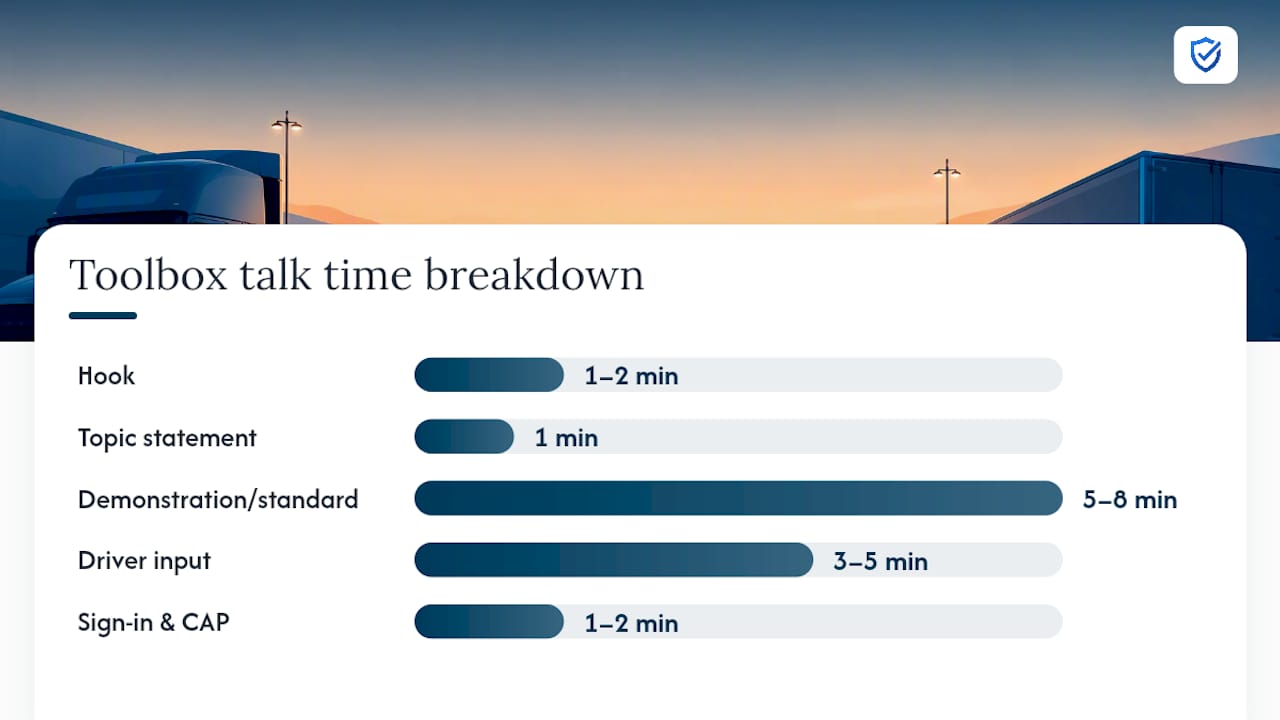
A 10 to 15 minute talk built around one hazard, with driver input and a signed sheet at the end, is the practical standard for effective toolbox talks. Longer sessions don’t produce better records. They produce distracted drivers and thinner notes.
Run the meeting in five steps:
- Hook (1 to 2 minutes): open with a real example, a near-miss, or a recent citation that makes the topic feel relevant right now.
- Topic statement (1 minute): name the hazard and the standard you expect drivers to follow.
- Demonstration or standard (5 to 8 minutes): walk through the correct procedure, using CDL manual content such as the seven-step inspection method where it applies.
- Driver input (3 to 5 minutes): ask what drivers are seeing on the road and note anything worth escalating.
- Sign-in and CAP assignment (1 to 2 minutes): pass the sheet, assign any corrective actions on the spot, and set a due date.
For absences, schedule a short make-up session within the week and document it as a separate log entry linked to the original meeting date, so the driver’s file shows continuity rather than a blank spot.
Pro Tip: Assign every CAP a due date before the meeting ends, not after. A corrective action without a deadline tends to sit open indefinitely, and an open CAP with no follow-up date is exactly what an auditor flags first.
Digital vs. Paper Logs: What Auditors Actually Expect
Paper sign-in sheets fail in predictable ways: they get lost in a truck cab, filed late, or filled out in handwriting nobody can read six months later. Practitioner reports consistently note that digital signature capture and centralized cloud storage cut down on that loss and tampering risk while making retrieval close to instant. Auditors don’t treat a missing paper sheet as a minor clerical issue. They treat it as a gap in the pattern of safety communication, and scattered records create a negative inference even when the meetings genuinely happened.
A digital system worth trusting with your vehicle safety meeting records should offer:
- Timestamped e-signatures tied to each attendee
- Device and timestamp details confirming when the sign-in occurred
- An immutable audit trail that can’t be edited after the fact
- Centralized, searchable storage across drivers, dates, and locations
- One-click exportable reports formatted for an inspector
If you’re migrating old paper archives, don’t just scan and dump them into a folder. Attach a short note to each uploaded record stating the original paper date, who performed the upload, and a verification flag, so the chain from paper to digital stays visible instead of looking like a record created after the fact.
Record Retention and Fast Audit Response
FMCSA rules require carriers to maintain driver qualification files for defined retention periods, and meeting logs belong in that same file structure. A practical rule of thumb: keep driver safety meeting logs for at least three years, alongside the driver’s qualification file, so a DOT or OSHA request pulls a complete picture rather than a partial one.
To retrieve records fast during an audit:
- Organize logs in a driver-centric view so you can pull one driver’s full meeting history in seconds
- Tag entries by date, topic, and CAP status for quick filtering
- Package each meeting log with its related incident report and CAP sign-off, since that combination gives an inspector context instead of an isolated data point
A documentation-review checklist built around these categories makes a 48-hour audit request manageable instead of a scramble.
Turning Meeting Logs Into Corrective-Action Evidence
A meeting note that mentions a problem without linking it to a CAP is a missed opportunity. The stronger workflow runs like this: a violation or near-miss gets logged, a CAP is assigned with an owner and due date, the item gets discussed again at the next meeting, and the follow-up gets noted and closed.
That loop does two things at once. It gives auditors a concise, verifiable link between a training topic and the issue it addressed, and it lets you spot repeat problems across drivers or routes by scanning aggregated logs instead of relying on memory.
- Sample phrasing: “Driver #2203 cited for following distance in March. Discussed space management at April 4 meeting. CAP closed April 18 after ride-along verification.”
- Use recurring CAP categories (hard braking, following distance, pre-trip skips) to prioritize which topics deserve repeat coverage.
Pro Tip: Run a quarterly scan of closed CAPs by category. If the same violation type keeps reopening across different drivers, the fix isn’t another meeting on the topic. It’s a process change upstream.
What Matters Most to a Busy Safety Manager
If you’re running a fleet, you don’t need a perfect record. You need one that survives contact with an inspector. That means prioritizing attendance capture, CAP linkage, and centralized storage over polish or length.
Short, repetitive topics build muscle memory in drivers and a consistent paper trail for you. The systems worth adopting are the ones that reduce friction for supervisors standing in a truck yard at 6 a.m., not the ones that look impressive in a sales pitch.
“Fleet safety managers face unique documentation challenges with dispersed drivers. MySafetySolution enables remote mobile sign-ins and centralized logs, ensuring your fleet's safety meetings remain completely audit-ready from anywhere.”
— Matthew Hoffman, President - MySafetySolution
Automate Your Driver Safety Meeting Logs With My Safety Solution
My Safety Solution replaces the spreadsheet-and-paper patchwork most fleets patch together with mobile sign-in, e-signatures, and timestamps captured the moment a meeting ends, not weeks later when someone finally gets around to filing.

Every meeting record lands in searchable training records you can filter by standard and export as a PDF with a sign-off page. Topics come from a library of 2,500+ tailgate and toolbox talks, with schedules ranked by real OSHA injury and citation data for your trade and state, so your driver training meeting notes stay relevant instead of recycling the same generic talking points. Hazard and near-miss reports keep the issues drivers raise on file. When an audit request lands, you export a complete report in minutes instead of digging through binders.
Plans are priced by headcount, and every plan includes the same features. Compare plans on the pricing page, start your 15-day free trial, or see how the platform fits trucking operations specifically on the safety software for trucking page.
Sources
For deeper reference: FMCSA’s driver qualification checklist, the CDL manual’s driving safely section for topic ideas, and a downloadable 3-year audit-ready sign-in sheet.
- How Carriers Should Document Internal Safety Meetings for DOT Audits
- Vehicle safety toolbox talk: how to run one that actually works
- Fleet Safety Meeting Documentation Review checklist
- Section 2 — Driving safely (Michigan CDL manual)
FAQ
What Are Good Safety Topics for Driver Meetings?
Strong topics include pre-trip inspection using the seven-step method, following distance, distracted driving, hours-of-service compliance, and winter driving procedures. The Michigan CDL manual lists core competencies like space management and emergency procedures that make reliable recurring topics. Pick topics tied to recent incidents or DVIR findings for the strongest audit relevance.
How Many Days of Logs Must a Driver Have?
FMCSA doesn’t set one fixed number of meeting days, but driver qualification files carry defined retention periods that meeting logs should follow. A practical standard is to keep meeting logs on file for at least three years alongside the driver’s qualification record.
What Are the 5 C’s of Safe Driving?
Definitions of this phrase vary across trainers and materials, and there’s no single FMCSA-recognized version. Rather than teach an unverified acronym, build meeting content around documented competencies like space management, hazard perception, and vehicle control from the CDL manual.
Are Trucking Companies Required to Have Safety Meetings?
FMCSA doesn’t mandate a specific meeting frequency or format, but auditors expect documented, retrievable proof that safety communication and corrective action happen regularly. Carriers without a consistent meeting record face a harder time demonstrating oversight during a DOT audit.
How Much Does My Safety Solution Cost?
Plans are priced by headcount, every plan includes the same features, and there is a 15-day free trial with no credit card. Current details are on the pricing page.