
An automated compliance report is a digital, timestamped record of a safety meeting that captures who attended, what topic was covered, who delivered it, and how each attendee’s presence was verified. That single record gives you audit-ready proof that instruction actually happened, exactly when an OSHA inspector or an insurance auditor asks for it. The payoff is measured in minutes: instead of hunting through clipboards, you pull a filtered export and hand it over.
TL;DR:
- Digital records include verified attendance, digital signatures, and comprehension results, making inspection-ready proof more reliable than paper sign-in sheets.
- Automated reports enable quick retrieval of complete meeting histories filtered by project, date, or crew, reducing search time from minutes to seconds.
- Maintaining records for the length of employment plus a few years meets OSHA and most state standards, with regular export testing preventing delays during inspections.
- Role-based access control and encryption are essential for safeguarding sensitive personal and attendance data against misuse or breaches.
- State-specific regulations often require additional documentation or retention periods, which digital systems can accommodate with flexible policy adjustments.
Table of Contents
- What Does an Automated Compliance Report Contain?
- Why This Matters Under OSHA: The Regulatory Context and Inspection Risks
- How Automated Reports Improve Audit Readiness and Program Value
- How to Roll Out Automated Compliance Reports on Your Sites
- Audit Readiness Checklist: What to Hand an Inspector
- How a Purpose-Built Safety Meeting Platform Runs This in Practice
- Data Security and Privacy Considerations for Automated Reports
- Legal Compliance Beyond OSHA: State Rules and Updates
- Field Perspective: Practical Tips and Common Pitfalls
- How My Safety Solution Turns This Into Ready-to-Export Reports
- Sources
What Does an Automated Compliance Report Contain?
Auditors don’t need a novel. They need specific, verifiable fields that answer the question “did this training happen, and can you prove it?” A record missing even one of these fields weakens your position during an inspection.
The minimum fields OSHA-focused documentation should carry are:
- Date and duration of the meeting
- Topic, mapped to the specific standard it addresses
- Trainer name, since 29 CFR 1926.21 expects instruction to come from someone qualified to deliver it
- Attendee identity, verified rather than self-reported
- Verification method, whether that’s a signature, an authenticated login, or a badge scan
Beyond the minimum, stronger records add a digital signature captured on each attendee’s own phone, comprehension results from a short quiz, and a link to any corrective action the meeting triggered. When it’s time to export, the format matters as much as the content. A single export that filters by date range and by crew, rather than one file per meeting, is what lets you hand an inspector a complete answer in one document instead of forty scattered ones.
Why This Matters Under OSHA: The Regulatory Context and Inspection Risks
OSHA’s construction training standard, 29 CFR 1926.21, requires employers to instruct workers in recognizing and avoiding unsafe conditions. The regulation itself doesn’t demand a specific paperwork format, but OSHA guidance is clear that if you can’t produce documentation, an inspector can treat the training as if it never happened. That’s the trap paper systems fall into most often: the training occurred, but the proof didn’t survive the job site.
OSHA’s own training guidance confirms electronic records are fully acceptable, provided they’re accurate and retrievable when requested. Specific standards go further. 29 CFR 1926.1207, for example, requires that training records show the employee’s name, the trainer’s name, and the training date, and that those records stay available for the length of employment.
A sign-in sheet passed around a truck bed and left in a glovebox for six months is not retrievable in any meaningful sense. It’s often illegible, sometimes missing entirely, and occasionally signed by someone who was on a different crew that day.
Paper’s failure modes are consistent across job sites: smudged handwriting, lost sheets, and proxy sign-ins where one worker signs for another. Digital records fix all three at once. A timestamp can’t be backdated casually, and a signature captured on each worker’s own phone at the meeting makes it much harder for one person to sign for another.
How Automated Reports Improve Audit Readiness and Program Value
Retrieval speed is the most immediate difference. A safety manager searching a filing cabinet for last March’s fall-protection talk might spend twenty minutes finding it, if it’s there at all. A digital archive returns the same record through a search box in seconds, with legible text every time.
Digital records also carry more evidentiary weight than a signature alone. A timestamp, a digital signature, and a sign-in on the worker’s own phone together tell an auditor three independent things were true at once: the meeting happened, at that time, and this specific person was present for it. That layered proof is harder to dispute than a signature that could belong to anyone.
There’s a second, less obvious benefit. Participation rates, topic coverage, and comprehension scores function as leading indicators that flag risk before it turns into an incident. A crew with declining attendance at hazard-specific talks, or one that consistently fails comprehension checks on fall protection, is telling you something worth acting on before an injury does.
Pro Tip: Track comprehension scores by topic, not just by crew. A pattern of low scores on one specific hazard, across multiple crews, usually points to a training material problem rather than a worker problem.
Practical benefits worth building your program around:
- Records stay legible and searchable indefinitely, unlike paper
- Authenticated check-ins reduce disputes over who was actually present
- Comprehension data lets you fix weak training content before it causes a near-miss
How to Roll Out Automated Compliance Reports on Your Sites
Moving from paper to digital records works best as a deliberate rollout, not a one-day switch. Skipping steps here is how safety managers end up with digital records that are just as unreliable as the paper ones they replaced.
- Standardize your mandatory fields first. Decide, in writing, that every meeting record must capture date, topic, trainer, attendee identity, and verification method, and lock those fields into whatever tool you use so nobody can skip them.
- Capture attendance at the point of delivery. QR codes or a sign-in link that each worker opens on their own phone stop the proxy sign-in problem before it starts. When every worker signs on their own device at the talk, one worker can’t sign in for five others from the truck.
- Add verification where the topic demands it. A short comprehension quiz or a trainer attestation turns an attendance record into proof of understanding, which matters most for topics like fall protection or hazard communication where OSHA cares about proficiency, not just presence.
- Link follow-up actions to the record. If a meeting surfaces a hazard that needs a corrective action, tie that action directly to the meeting record so the two don’t live in separate systems.
- Set a retention policy and test your export before you need it. A reasonable default is retaining records for the length of employment plus a few years, unless a specific standard requires longer. Then actually run a test export, filtered by project and date range, so you’re not learning the export tool during a live inspection.
Pro Tip: Run a mock inspection once a quarter. Pick a random date and crew, and time how long it takes to produce a complete, exportable record. If it takes longer than five minutes, your workflow needs fixing before an actual inspector finds that out for you.
Audit Readiness Checklist: What to Hand an Inspector
When an inspector asks for meeting records, hesitation reads as disorganization even when your program is solid. Knowing exactly what to produce, and how fast, changes that impression immediately.
At minimum, be ready to produce:
- Attendance records with a verification method attached to each name
- Topic-to-standard mapping showing which OSHA requirement each meeting addressed
- Trainer identification and, where relevant, their credentials
- Meeting duration
- Any corrective actions or follow-ups linked to that specific meeting
Assembling this fast depends on filtering, not searching. A system that lets you filter by project, date range, and crew in one pass produces a single exportable packet instead of a folder of loose files. OSHA’s own training documentation guidance confirms electronic records satisfy retrievability requirements, provided they’re accurate and accessible on request, which is exactly what a filtered export demonstrates.
Keep long-term copies outside the app itself too. A quarterly backup export, stored separately, protects you if there’s ever a service disruption or account issue right when you need historical OSHA training documentation the most.
How a Purpose-Built Safety Meeting Platform Runs This in Practice
A platform designed specifically for field safety meetings operationalizes everything above instead of leaving it to manual discipline. That distinction matters because manual processes degrade the moment a busy foreman skips a field.
The capabilities that matter most map directly onto the checklist:
- Mandatory fields locked into every meeting record, so nothing gets skipped under deadline pressure
- Timestamped attendance with digital signatures, signed on each worker’s own phone, to reduce proxy sign-ins
- Built-in quizzes that convert attendance into proof of understanding
- Hazard and near-miss reports kept alongside the meeting records
- Searchable records you can filter by standard and export as PDF for inspection requests
The operational payoff shows up in admin time. Safety managers spend less time chasing paperwork and more time reviewing attendance and quiz results that flag declining participation or weak comprehension before they become incidents. Safety meeting software built for construction handles the capture and export mechanics so the safety manager’s attention stays on the data, not the paperwork.
Data Security and Privacy Considerations for Automated Reports
Digital records carry names, timestamps, and signatures, which makes them more useful as evidence but also raises the stakes if that data is mishandled. Research on construction safety digitalization points to data security as one of the genuine adoption barriers alongside the clear accessibility gains.
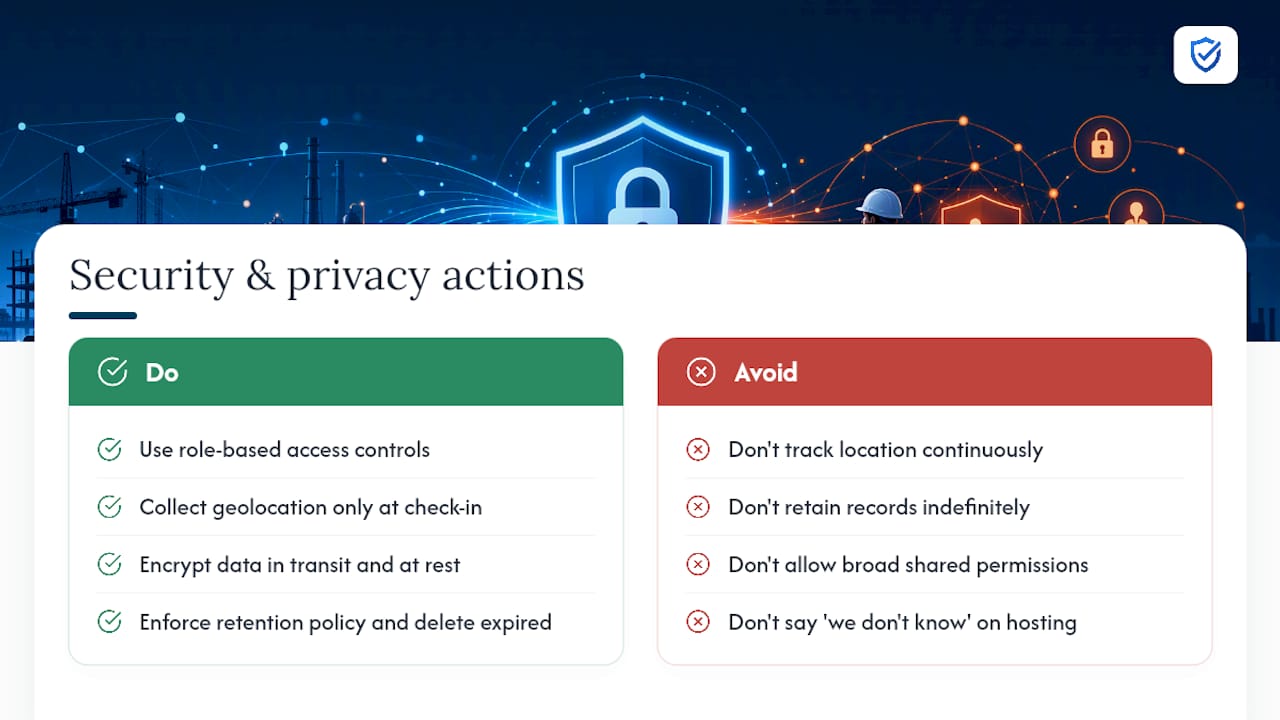
Access control is the first line of defense. Role-based permissions, separating what a worker, a trainer, an admin, and a consultant can each see and edit, prevent records from being altered after the fact, which matters enormously if a record’s integrity is ever challenged in a dispute.
If a system collects geolocation data, that data deserves its own scrutiny. It can be a powerful anti-proxy tool, but it’s also personal location information, so it should be collected only during active check-in windows, not tracked continuously, and stored with the same access restrictions as attendance data itself.
Encryption in transit and at rest is table stakes at this point, but retention discipline matters just as much. Keeping records only as long as your retention policy requires, rather than indefinitely, limits your exposure if a breach ever does occur. Any platform handling this data should be able to explain plainly where records are hosted, who can access them, and how exports are logged, because “we don’t know” is not an answer that holds up during a legal dispute or a client audit.
Legal Compliance Beyond OSHA: State Rules and Updates
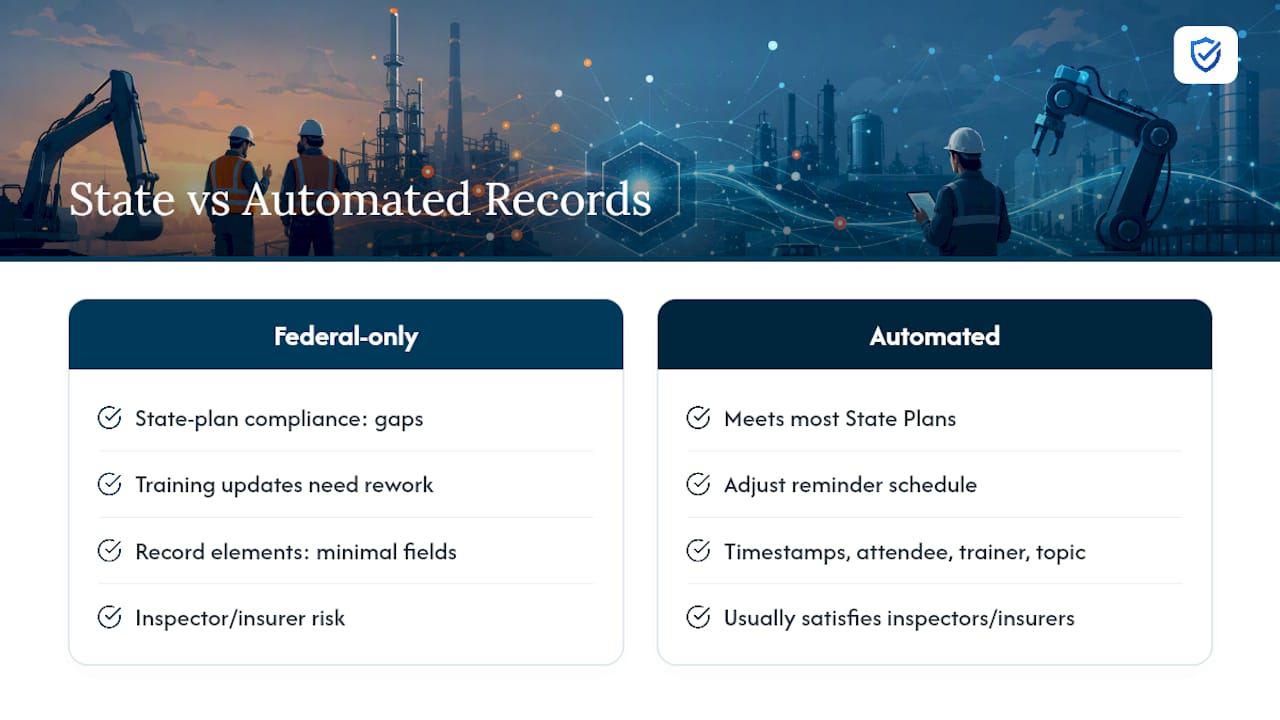
OSHA sets the federal floor, but it isn’t the only authority a safety manager has to satisfy. Several states run their own OSHA-approved State Plans, and some of these plans layer additional documentation or training requirements on top of federal rules, particularly in construction and manufacturing.
California’s Cal/OSHA program, for instance, has historically required more detailed injury and illness prevention program documentation than the federal baseline. Washington and other State Plan states have their own variations on training frequency and recordkeeping specifics. A compliance report format built to satisfy only the federal minimum can leave gaps when a state inspector applies a stricter local standard.
Automated records handle this variability better than paper because the underlying data, timestamps, attendee identity, topic, and trainer, satisfies most state-level requirements without any structural change. What typically differs is retention length or the frequency a topic must be covered, both of which are policy settings rather than fields you’d need to redesign. When a state updates its training frequency rules, as several have done periodically for topics like heat illness prevention, a digital system lets you adjust a reminder schedule rather than retrain your entire documentation process.
Insurance carriers and workers’ compensation auditors also increasingly request the same kind of timestamped, verifiable records inspectors do, even outside a formal OSHA inspection. A record built to satisfy OSHA’s retrievability standard tends to satisfy those parallel requests with no extra work.
Field Perspective: Practical Tips and Common Pitfalls
QR code sign-in on each worker’s own phone closes the proxy sign-in gap faster than any policy memo ever will. Keep talks short and specific to the day’s actual hazard. A ten-minute talk on the exact task ahead gets remembered; a generic fifteen-topic monthly review doesn’t.
Practice the export workflow before you need it. The safety managers who look calm during an inspection are the ones who’ve already run the export once, on a random Tuesday, just to see how long it takes.
“Safety managers shouldn't spend days piecing together spreadsheets for an audit. MySafetySolution compiles every meeting, signature, and topic into instantaneous, exportable compliance reports ready for any inspector.”
— Matthew Hoffman, President - MySafetySolution
How My Safety Solution Turns This Into Ready-to-Export Reports
A platform built around the exact fields inspectors ask for includes mandatory attendance, timestamps, trainer identification, and topic mapping, locked in from the first meeting you log. There’s no rebuilding your process later to add what you skipped early on.

Crews sign on their own phones by QR code or link, or the leader records the sign-off, with digital signatures and timestamps, and records are searchable, filterable by standard, and exportable as PDF with a sign-off page instead of one-off files that need to be stitched together manually. A library of 2,500+ talks in English and Spanish, built on Cal/OSHA Title 8 and federal OSHA 29 CFR, with schedules ranked by real OSHA injury and citation data for your trade and state, also handles the part safety managers dread most: finding a fresh, hazard-specific talk every week without repeating the same generic material.
If your current process still depends on a clipboard, sign-in sheets, or a spreadsheet someone updates once a month, that gap will show the moment an inspector asks for a specific date. Start your 15-day free trial and run your first meeting this week. See exactly what an exportable, audit-ready record looks like before you need one for real.