
Construction safety management systems are structured frameworks that integrate safety policies, hazard identification, risk controls, and worker involvement to reduce workplace incidents and maintain regulatory compliance. In the United States, construction remains one of the most hazardous industries, making a formal safety management system (SMS) not a luxury but an operational necessity. Standards like ISO 45001:2018 and OSHA regulations set the compliance floor, but the most effective programs go well beyond minimum requirements. This guide breaks down the core components, regulatory requirements, and practical strategies that safety professionals and project managers need to build systems that actually work on the ground.
What are the core components of a construction safety management system?
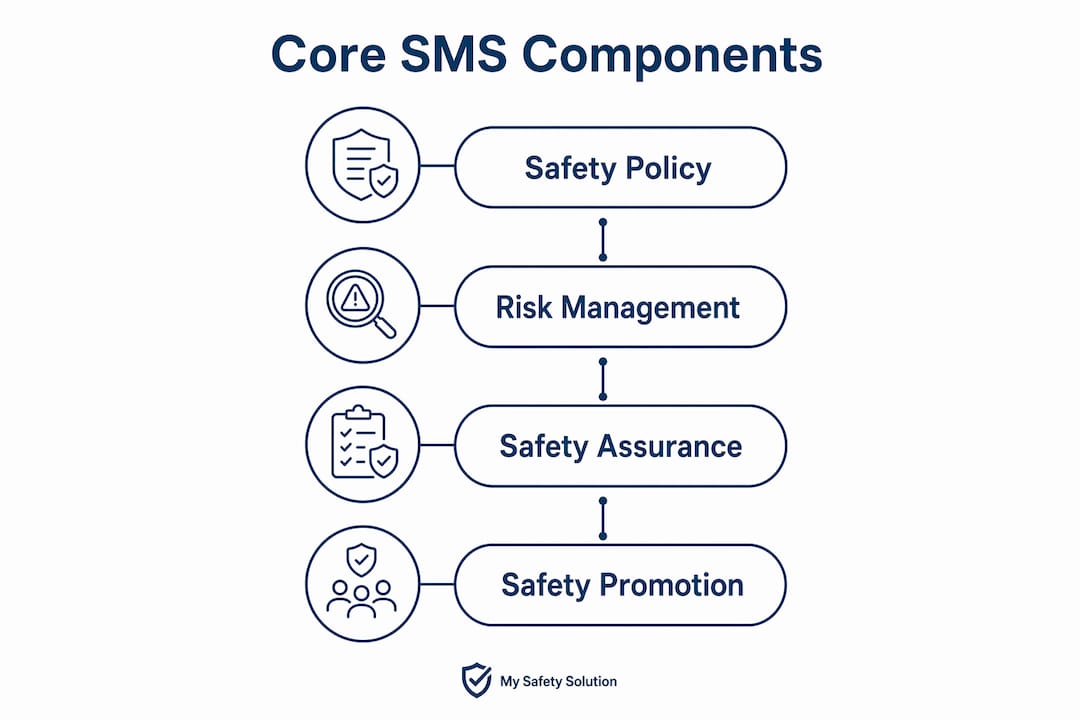
A construction SMS rests on four interdependent pillars: safety policy, risk management, safety assurance, and safety promotion. Each pillar reinforces the others. A strong safety policy sets the tone from leadership; risk management identifies and controls hazards before they cause harm; safety assurance monitors whether controls are working; and safety promotion builds the culture that sustains all three.

Embedding these pillars into daily operations requires more than a policy binder on a shelf. Integrating safety protocols into project planning and scheduling means hazard identification happens before crews mobilize, not after an incident report is filed. That shift from reactive to proactive is the defining characteristic of a mature safety program.
Effective monitoring mechanisms include:
- Inspection schedules: Regular site walkthroughs with documented findings and corrective actions
- Observation programs: Supervisors recording safe and at-risk behaviors in real time
- Incident reporting: Near-miss and incident data feeding back into hazard controls
- Safety meetings: Structured tailgate meetings that review current site conditions and upcoming work phases
Pro Tip: Schedule hazard identification reviews at the start of each new project phase, not just at project kickoff. Conditions change as work progresses, and a risk assessment from week one rarely covers the hazards present in week twelve.
Effective monitoring creates a continuous feedback loop that informs corrective actions and drives measurable improvement over time.
How do regulatory standards shape safety management system requirements?
The regulatory framework for site safety management in the United States centers on OSHA standards, while internationally, ISO 45001:2018 provides the most widely adopted management system structure. ISO 45001 implementation significantly improves safety compliance and worker participation when supported by visible management commitment and targeted training programs. That finding, drawn from a study of 124 construction employees, confirms that the standard delivers results when applied with genuine organizational support.
A critical distinction that many project managers miss is the difference between an SMS and a Safety Management Plan (SMP). Confusing the two creates administrative burdens and inconsistent compliance across projects.
| Feature | Safety Management System (SMS) | Safety Management Plan (SMP) |
|---|---|---|
| Scope | Company-wide, permanent framework | Project-specific, temporary document |
| Purpose | Governs all safety operations and culture | Addresses risks unique to one project |
| Duration | Ongoing, continuously updated | Active for the life of the project |
| Ownership | Senior leadership and safety team | Principal contractor for that project |
| Regulatory basis | ISO 45001, OSHA standards | Model WHS Regulations, project codes |
Model WHS Regulations require principal contractors to prepare a written WHS management plan before construction work begins. That plan is project-specific and sits beneath the company-wide SMS. Treating the SMP as a substitute for the SMS leaves the organization without a permanent safety infrastructure. Treating the SMS as sufficient without a project-specific plan leaves site crews without the hazard controls relevant to their actual work conditions.
Aligning both documents with OSHA regulatory codes and ISO 45001 principles gives construction firms a defensible, auditable safety record. A workplace health and safety plan that references the company SMS creates a clear chain of accountability from the boardroom to the job site.
What are best practices for implementing construction safety programs?
Management commitment is the single strongest predictor of SMS success. Safety standards achieve full potential only when leadership provides visible, sustained commitment and active frontline worker involvement. That means safety managers walking the site, executives attending safety meetings, and supervisors stopping work when conditions are unsafe.
Worker involvement is equally non-negotiable. Frontline crews identify hazards that supervisors and planners miss because they are the ones performing the work. Structured hazard identification programs that solicit worker input, and act on it, build the trust that sustains a safety culture over time.
Common implementation failures include:
- Treating SMS as a paperwork exercise: Documents filed and forgotten do not prevent incidents. The system must drive daily behavior.
- Skipping targeted training: Generic safety training does not address site-specific risks. Training programs must match the actual hazards workers face.
- Ignoring near-miss data: Near misses are leading indicators. Organizations that track and analyze them prevent the incidents that follow.
- Failing to update controls: Embedding hazard identification into each project phase prevents the gap between documented controls and actual site conditions.
Pro Tip: Integrate safety review checkpoints into your project management schedule the same way you schedule material deliveries and inspections. When safety reviews appear on the project timeline, they become routine rather than reactive.
Tier-one construction firms have raised the bar on subcontractor accountability. Pre-qualification audits now assess active participation evidence, not just document submissions. That shift signals an industry-wide move toward continuous monitoring and genuine worker involvement as the standard for safety compliance.
What role does technology play in modern site safety management?
Technology has changed what is operationally possible for construction safety programs. Safety management software connects field teams, centralizes documentation, standardizes inspection checklists, and delivers real-time analytics that manual systems cannot match. The result is faster identification of risk patterns and faster corrective action.
Digital safety platforms deliver measurable advantages across several functions:
- Centralized records: All inspection reports, incident logs, and corrective actions stored in one searchable system, creating a complete audit trail
- Standardized checklists: Site-specific inspection forms that ensure consistent hazard identification across crews and shifts
- Real-time analytics: Dashboards that surface trends in near-miss data, inspection findings, and training completion rates
- Attendance tracking: Digital sign-in for safety meetings that produces verifiable compliance records for OSHA audits
- AI-powered content: Platforms like My Safety Solution generate tailored safety meeting topics based on current site conditions and regulatory requirements
My Safety Solution is purpose-built for deskless construction workforces. The platform automates safety meeting management, tracks attendance digitally, and generates OSHA-compliant records without the administrative friction of paper-based systems. Safety managers report reduced incident rates and cleaner compliance records after adoption. When technology handles documentation, safety professionals can focus on the field work that actually prevents injuries.
Key Takeaways
A construction SMS works only when management commitment, worker involvement, and continuous monitoring operate together as a system rather than as separate checkboxes.
| Point | Details |
|---|---|
| Define SMS vs. SMP clearly | An SMS is a permanent company framework; an SMP is a project-specific plan. Conflating them creates compliance gaps. |
| Anchor to ISO 45001 | ISO 45001:2018 provides a proven structure for safety compliance when backed by visible leadership and training. |
| Embed safety in project scheduling | Hazard identification reviews at each project phase prevent risks from appearing faster than controls can address them. |
| Treat worker input as data | Frontline crews identify hazards that planning documents miss. Structured feedback programs capture that knowledge. |
| Use technology to close the audit trail | Digital platforms centralize records, standardize checklists, and produce verifiable compliance documentation automatically. |
The compliance trap most safety managers fall into
After working closely with construction safety programs across multiple project types, one pattern stands out above all others: organizations that treat their SMS as a compliance artifact rather than an operational tool consistently underperform on both safety outcomes and audit results.
The paperwork looks right. The binders are full. The ISO 45001 certificate is framed on the wall. But the system is not actually running. Supervisors are not conducting structured observations. Near-miss reports are not being analyzed. Safety meetings are happening, but the topics are generic and the sign-in sheets are the only output.
The clearest signal of a real SMS versus a paper one is what happens after an incident. In organizations with genuine systems, the incident triggers a root cause analysis, a control update, and a training adjustment within days. In organizations with paper systems, it triggers a report that gets filed.
The distinction between SMS and SMP matters more than most project managers realize. I have seen firms spend weeks producing elaborate project-specific safety plans while their company-wide SMS sits unchanged for years. The SMP becomes the de facto safety program, which means every new project starts from scratch. That is an enormous waste of institutional knowledge and a direct source of compliance inconsistency.
Technology closes some of these gaps, but it does not replace the cultural work. A digital platform that automates attendance tracking and generates meeting topics removes friction from the administrative side. The harder work is getting management to show up, ask questions, and act on what workers tell them. That part has no software substitute.
“A safety management system is only as good as what actually happens on the job site. MySafetySolution bridges executive safety policy and daily field reality with frictionless mobile attendance and compliance verification.”
— Matthew Hoffman, President - MySafetySolution
How My Safety Solution supports your safety compliance program
Construction safety professionals carry a heavy documentation burden. Meeting records, inspection logs, corrective action tracking, and OSHA audit preparation consume hours that could go toward actual risk management on the site.
My Safety Solution was built to reduce that burden without reducing compliance quality. The platform automates safety meeting management for construction teams, generates AI-powered meeting content tailored to current site conditions, tracks attendance digitally, and produces OSHA-compliant records automatically. Safety managers using My Safety Solution spend less time on paperwork and more time on the field activities that prevent incidents. If your current system relies on spreadsheets and paper sign-in sheets, explore what My Safety Solution offers for construction safety compliance.
FAQ
What is a construction safety management system?
A construction safety management system is a structured, company-wide framework that integrates safety policies, hazard controls, risk management processes, and worker involvement to reduce incidents and maintain regulatory compliance. It is a permanent operational system, not a project-specific document.
How does an SMS differ from a safety management plan?
An SMS is a permanent, company-wide framework governing all safety operations, while an SMP is a temporary, project-specific plan required before construction work begins. Conflating the two creates compliance inconsistencies and administrative duplication.
What does ISO 45001:2018 require for construction?
ISO 45001:2018 requires organizations to establish a safety management framework covering hazard identification, risk controls, worker participation, and continuous improvement. Research confirms the standard delivers measurable safety gains when leadership provides visible commitment and supports targeted training programs.
What are the most common SMS implementation failures?
The most common failures are treating the SMS as a paperwork exercise, using generic training that does not match site-specific hazards, and failing to act on near-miss data. Managing safety effectively requires active leadership and structured worker feedback, not just completed forms.
How does safety management software improve compliance?
Safety management software centralizes documentation, standardizes inspection checklists, automates attendance tracking, and delivers real-time analytics on safety trends. These functions produce a complete audit trail that supports OSHA compliance and reduces the administrative load on safety managers.