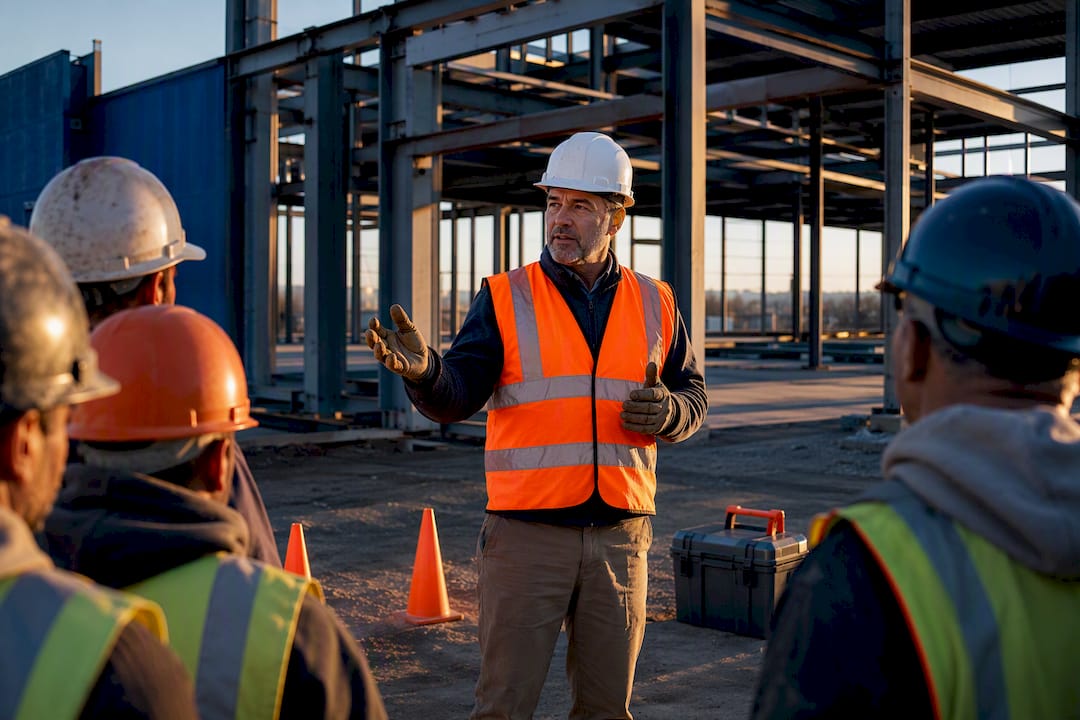
AI safety topics are supervisor-ready, AI-generated toolbox and tailgate talk scripts that cut prep time and produce audit-ready records. They give safety managers a fast starting point for daily briefings, built around the same instruction duty OSHA outlines in 29 CFR 1926.21(b)(2) and the short-session format NLTAPA and T2 guidance recommend. Platforms like My Safety Solution generate the draft; supervisors add local detail and capture attendance to close the loop.
TL;DR:
- AI-generated safety talks must be tailored with real-time site, weather, and incident data to remain relevant and effective for specific tasks and hazards.
- Supervision remains crucial for localizing AI drafts and ensuring talks address actual hazards, with a five-minute review significantly reducing the risk of generic scripts.
- Documenting the delivery with time-stamped attendance and script versioning creates audit-ready records that meet OSHA requirements and mitigate compliance risks.
- Relying solely on AI drafts without human validation and proper recordkeeping risks delivering ineffective safety communication and potential regulatory issues.
- Industry-specific customization and engaging delivery methods, such as open discussion and visual aids, are key to keeping crews attentive and improving safety outcomes.
Table of Contents
- What Do AI Safety Topics Actually Do?
- How Do You Turn an AI Topic Into a Tailgate Talk?
- What Should a One-Page Safety Talk Template Include?
- What Records Do OSHA Auditors Expect From AI-Assisted Talks?
- An Editor’s Note on AI, Prep Time, and Supervisor Judgment
- What Risks Come With AI-Generated Safety Content?
- What Are the Best Practices for Using AI in Safety Talks?
- What Real AI-Assisted Safety Programs Look Like in Practice
- How Should AI Safety Topics Change by Industry and Role?
- How Do You Keep a Crew Engaged During a Safety Talk?
- The Gap Between a Good AI Script and a Compliant Program
- Get Audit-Ready Talks Without the Prep Time
- Sources
What Do AI Safety Topics Actually Do?
An AI safety topic generator pulls from your task list, crew makeup, weather conditions, and recent incident history to draft a talk that fits today’s job, not a generic script pulled from a binder. Feed it a concrete rigging task on a windy day with two near-misses last month, and it produces something closer to that reality than a stock “ladder safety” handout.
That draft is a starting point, not a finished product. The supervisor still needs to layer in the details AI cannot know: which scaffold on this specific site has a wobbly platform, which subcontractor crew just rotated in, what got flagged in yesterday’s walkaround. Treat the AI output as a scaffold you build on, never as a finished script you read cold.
Where this shows up in practice:
- Weekly toolbox talks covering standing hazards for the crew’s current phase of work
- Pre-task briefings before a specific high-risk activity, like a crane pick or confined-space entry
- Stand-downs after a near-miss or serious incident, when the topic needs to address exactly what happened
- Multilingual crews, where AI can draft the same content in multiple reading levels or languages for faster review
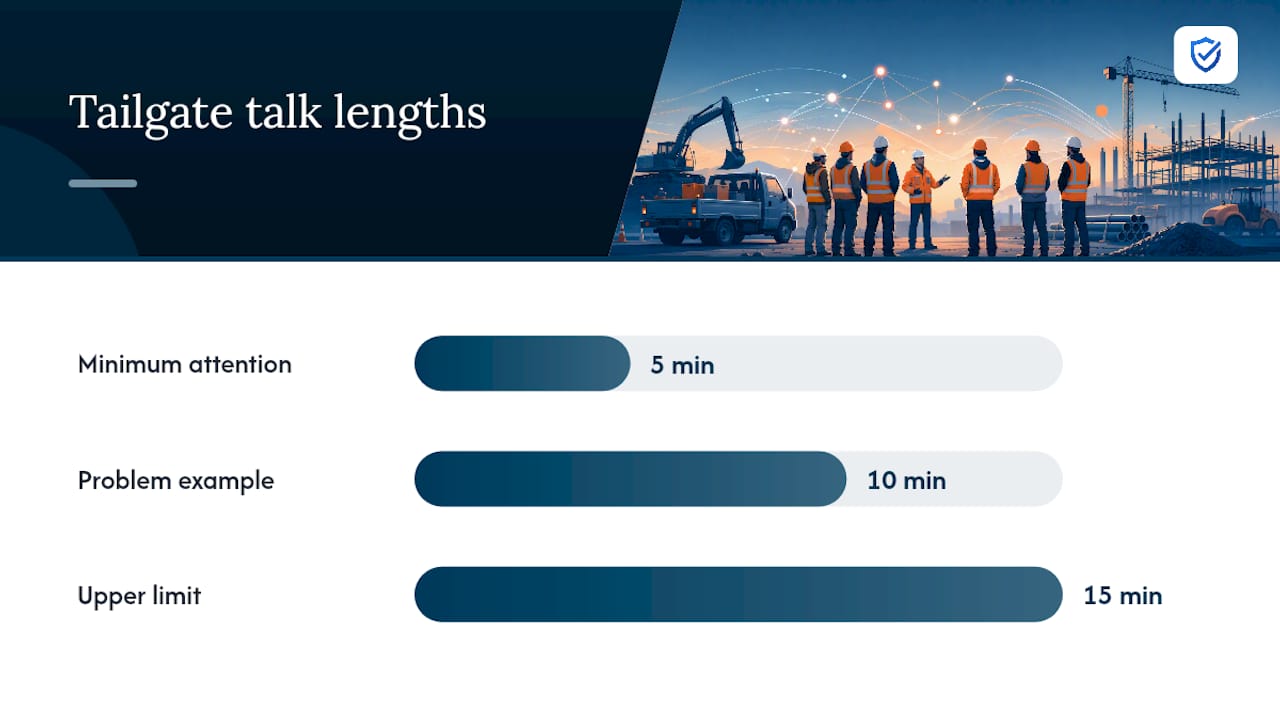
Daily briefs usually last a few minutes, generally enough time to cover key points without overloading the crew. Stand-downs and post-incident talks typically take longer to allow the crew sufficient time to ask questions and process what went wrong.
How Do You Turn an AI Topic Into a Tailgate Talk?
Generating a topic is the easy part. Turning it into a talk that holds a crew’s attention for 5 to 15 minutes, and leaves you with a record an auditor will accept, takes a repeatable process.
- Feed the AI real inputs. Give it today’s task list, crew size and primary language, any incidents or near-misses from the last two weeks, and the equipment actually on-site. Vague inputs produce vague topics.
- Edit for the site, not the screen. Add the local hazard the AI cannot see: the trench that’s been open three days, the forklift with a known brake issue, the stop-work point where the crew must pause and call you.
- Structure the delivery. Tailgate talk guidance from T2’s how-to guide recommends a simple shape: a hook that grabs attention, one hazard, two or three prevention bullets, a discussion question, and a signature line. Stick to one hazard per session. Trying to cover four hazards in ten minutes teaches none of them well.
- Capture attendance on the spot. A paper signature sheet works. A QR-code roll call or mobile-enabled timestamp works faster and travels better into a compliance file.
Pro Tip: Ask the discussion question before you give the answer. “What would you do if this trench started sloughing?” gets more engagement than a monologue, and it tells you whether the crew actually understood the hazard.
Skipping step two is the most common failure point. An unedited AI script reads like it was written for nobody in particular, because it was. The five minutes it takes to localize a draft is what separates a talk that lands from one the crew tunes out.
What Should a One-Page Safety Talk Template Include?
A working template needs three parts: something the supervisor reads from, something the crew keeps, and a checklist that happens before either of those gets used.
Supervisor script. Hook line, the day’s hazard stated in one sentence, three prevention bullets max, a stop-work trigger (“if you see X, stop and call me”), a discussion question, and signature fields for date, crew, and supervisor.
Crew handout. Strip it down to plain language: what the hazard is, what to do about it, who to tell if something looks wrong. Aim for a fourth-to-sixth-grade reading level. Workers skim these between tasks; dense paragraphs don’t get read.
Pre-talk checklist, walked through before the crew gathers:
- Walk the actual work area for anything new since yesterday
- Cross-check the topic against the job hazard analysis for that task
- Pick a visual aid if one helps (a photo of a near-miss, a piece of damaged equipment)
- Confirm whether translation or a bilingual handout is needed for this crew
Multilingual crews need the handout translated before the talk, not summarized verbally after. A rushed verbal translation loses detail exactly where detail matters most, in the prevention steps. My Safety Solution’s preloaded template library covers construction-specific formats built around this same three-part structure, which saves the setup work on the first pass.
What Records Do OSHA Auditors Expect From AI-Assisted Talks?
Federal OSHA doesn’t name “toolbox talks” as a required document. What it requires, under 29 CFR 1926.21(b)(2) and the General Duty Clause, is that employers instruct employees in hazard recognition. A documented toolbox talk is one of the clearest, cheapest ways to prove that instruction happened.
A defensible record needs these elements at minimum:
- Date and duration of the talk
- The topic covered, in enough detail to show it was site-specific
- Supervisor name and signature
- Attendee list with signatures or another attendance-capture method
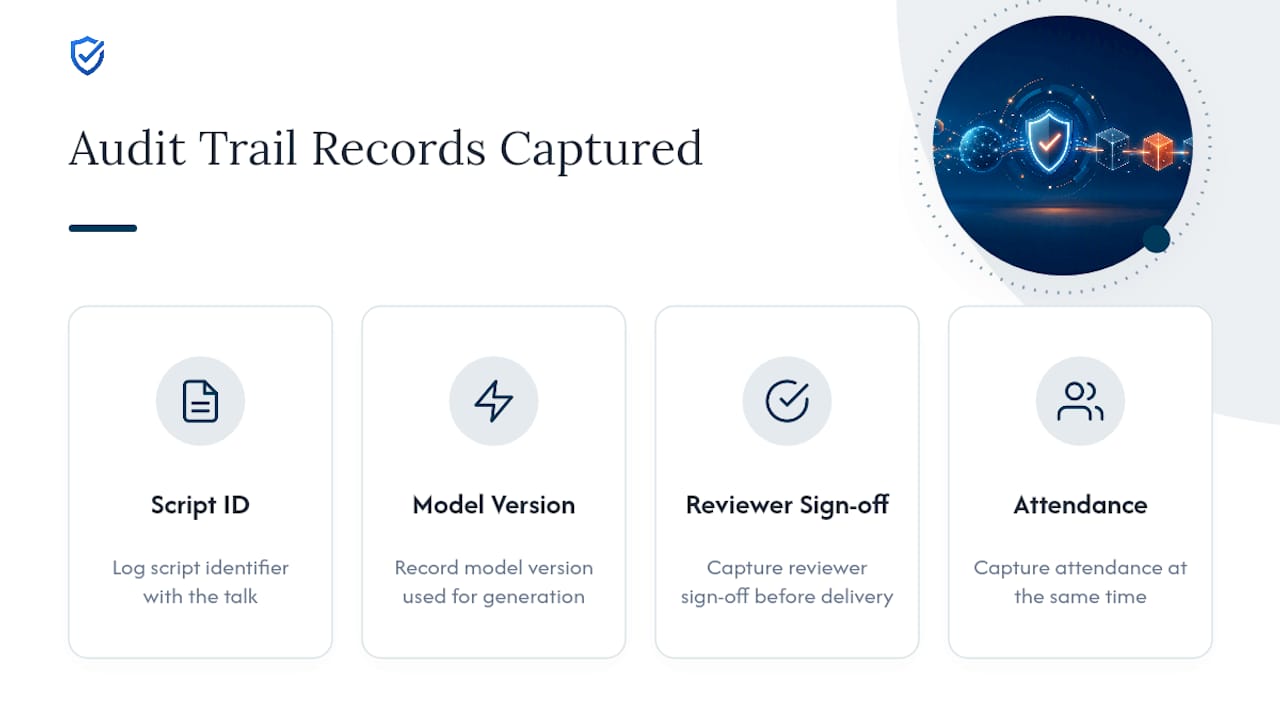
- A script ID or version number, if the content was AI-generated
- Reviewer name and timestamp confirming a human checked the draft before delivery
That last two points matter more with AI-generated content than with a talk pulled from a printed binder. A deep-dive on AI toolbox talk generators recommends logging the model version, the prompt or input that generated the script, and the reviewer’s name alongside the record, so you can reconstruct exactly what was said and who approved it if a claim ever gets contested months later.
One more wrinkle: state plans can be stricter than the federal floor. California’s Title 8, for example, layers additional frequency and documentation requirements on top of federal OSHA rules. Check your state plan before assuming the federal minimum is your ceiling.
An Editor’s Note on AI, Prep Time, and Supervisor Judgment
My Safety Solution’s AI topic generator drafts content from a crew’s task list, site conditions, and incident history, then hands it to the supervisor for final review before delivery. The platform’s mobile-enabled attendance capture ties that script directly to a timestamped, signed record, and its NLTAPA-aligned template library gives supervisors a starting structure instead of a blank page.
Safety managers using AI-assisted drafting report shorter prep time per talk and more consistent documentation across crews and shifts, since the format doesn’t vary from supervisor to supervisor the way hand-written notes do. The reminder worth repeating: AI drafts, humans finalize. A safety meeting system built for construction crews that links the generated script to attendance and sign-off is what turns a good draft into a defensible record, not the draft alone.
What Risks Come With AI-Generated Safety Content?
An AI topic generator is only as good as what it’s trained on and what data it’s given, and that creates a few specific failure points worth watching for.
Bias in topic selection. If the underlying data skews toward one type of incident or one industry’s Fatal Four hazards, the AI will keep surfacing those and underweight the hazards actually present on your site. A generator trained heavily on general construction data may miss the electrical arc-flash risks specific to a utility crew.
Privacy in incident data. Feeding an AI tool your near-miss reports or injury records to sharpen its output means that data lives somewhere. Ask any vendor how incident and crew data get stored and whether they’re shared across client accounts.
Robustness gaps. AI drafts a script based on patterns, not lived judgment. It won’t catch the wobbly scaffold plank or the new subcontractor who doesn’t know your lockout procedure. Industry reporting on AI-assisted safety workflows is consistent on this point: AI should assist, not replace, a qualified professional’s review.
None of these are reasons to avoid AI-generated content. They’re reasons to keep a human review step in every workflow and to ask vendors direct questions about data handling before you commit to one.
What Are the Best Practices for Using AI in Safety Talks?
A short set of habits separates teams that get real value from AI-generated content from teams that end up with generic, ignored scripts.
Ground every topic in real data. Connect the AI to your actual task list and incident archive rather than letting it draft from general industry assumptions. Talks tied to recent near-misses and sector-specific hazards land harder than abstract reminders, an approach that published toolbox talk guidance reinforces.
Configure for your crew, not a default setting. Set reading level, language, and length before generating content, not after you’ve already handed out a script that’s too dense for the audience.
Train supervisors on delivery, not just tool access. A supervisor who knows how to open with a hook and close with a real discussion question gets more out of an AI draft than one who reads it verbatim.
Keep the audit trail as part of the workflow, not an afterthought. Log script ID, model version, and reviewer sign-off at the same time you capture attendance, so nothing has to be reconstructed later.
Never skip human review. A supervisor’s five-minute pass before delivery is the single highest-leverage step in the entire process, because it catches the local hazards no AI model has visibility into.
These aren’t complicated rules. They’re the difference between an AI tool that saves real prep time and one that just adds another unread document to the file.
What Real AI-Assisted Safety Programs Look Like in Practice
Concrete case studies specific to AI-generated toolbox talks are still limited, since this is a young application of the technology. But adjacent examples show both the upside and the guardrails clearly.
On the upside, reporting on AI-assisted HAZOP workflows describes teams using AI to turn hazard analysis into reusable, scenario-based training modules, letting the same core content get reused across shifts and sites instead of rebuilt from scratch each time. That reuse is exactly what a good toolbox-talk workflow should look like: one solid draft, adapted locally, delivered consistently.
The cautionary thread running through nearly every serious writeup on AI in safety work is the same: AI generates the scaffold, but qualified people validate it before it reaches the floor. A generic script delivered without local review is functionally the same risk as no talk at all, because it gives workers information that doesn’t match their actual job. The failure mode isn’t the AI being wrong; it’s a supervisor treating an unreviewed draft as finished work.
The lesson for safety managers isn’t to wait for a large-scale case study before adopting AI-generated content. It’s to build the review step into the process from day one, so the technology never operates without a person checking it against the real job site.
How Should AI Safety Topics Change by Industry and Role?
A script that works for a framing crew won’t work unedited for a utility line crew, and a generic hazard reminder won’t hit the same for a new hire as it does for a ten-year foreman.
By industry: Construction topics should track the Fatal Four (falls, electrocution, struck-by, caught-in/between) and phase-specific hazards. Manufacturing talks need to reflect fixed machinery, lockout/tagout, and repetitive-motion risk more than fall protection. Utility crews need topics built around energized equipment and storm response; a resource like Tri-County Electric’s storm safety guidance shows how quickly a recurring topic needs to shift when weather conditions change overnight. Public works and municipal teams often juggle traffic control, confined space, and seasonal hazards in the same week, which means their topic library needs more variety than a single-trade contractor’s.
By role: A foreman needs the discussion-question version, built to prompt crew engagement. A new hire needs more repetition of fundamentals and less assumption of prior knowledge. A multilingual crew needs the same hazard information delivered in a format that doesn’t lose nuance in translation. Manufacturing supervisors managing shift-specific machinery risks benefit from topic sets built around their sector’s actual injury patterns rather than a generic industrial-safety list.
The AI can adjust for all of this if you tell it to. The mistake is running the same default script across every crew and every trade because it’s faster than customizing.
How Do You Keep a Crew Engaged During a Safety Talk?
The content matters less than whether anyone’s actually listening, and a well-written AI script still fails if the delivery is flat.
Open with something concrete, not abstract. “Two crews had near-misses with this exact hazard last month” lands harder than “safety is everyone’s responsibility.” Specificity gets attention; platitudes lose it.
Ask, don’t just tell. Building a real discussion question into the script, and actually pausing for an answer, turns a monologue into a conversation. Guidance on running effective short training sessions consistently points to interaction as the single biggest lever for retention in brief, high-frequency training formats.
Keep it short enough that attention doesn’t drift. A 15-minute talk that could have been 6 minutes isn’t more thorough, it’s just longer. Respect the format’s time limits.
Use a visual when one exists. A photo of yesterday’s damaged equipment or a near-miss location does more than another verbal description of the same hazard.
Vary who talks. Letting a crew member who witnessed a near-miss describe it, briefly, does more for engagement than the same supervisor voice every single day.
None of this requires new tools. It requires treating the five minutes with the crew as a conversation worth having, not a box to check before the workday starts.
The Gap Between a Good AI Script and a Compliant Program
The conventional advice on AI safety topics stops at “it saves time,” and that undersells both the opportunity and the risk. Saving prep time is real, but it’s not the point. The point is whether the talk actually changes behavior on a specific job site, and whether you can prove it happened if an incident ever puts your program under review.
Most teams that adopt AI-generated content get the first half right and skip the second. They generate a script, read it to the crew, and move on without capturing a real audit trail, treating attendance as an afterthought instead of a required output. That’s backwards. The script is disposable. The record that a specific hazard was communicated to a specific crew on a specific date, with a supervisor’s name attached, is the asset that actually protects the company.
If there’s one place to focus first, it’s not the AI generation step. It’s the five minutes before delivery, when a supervisor localizes the draft, and the two minutes after, when attendance gets captured in a form that survives a records request months later. Get those two habits right and the AI is doing exactly what it should: removing the blank-page problem, not replacing supervisor judgment.
“Generic talks produce disengaged crews. MySafetySolution uses AI to generate site-relevant, hazard-specific topics in seconds, giving supervisors the exact talking points they need without the hours of research.”
— Matthew Hoffman, President - MySafetySolution
Get Audit-Ready Talks Without the Prep Time
Building a compliant toolbox-talk program by hand means someone on your team writing scripts, chasing paper signatures, and hoping the file holds up if OSHA ever asks. My Safety Solution replaces that manual cycle with AI-generated topics tied directly to digital attendance capture, so every talk produces its own audit-ready record the moment it’s delivered.

The platform pulls from a preloaded, NLTAPA-aligned template library and generates topics tailored to your crew, task list, and incident history, then lets supervisors edit before delivery and capture signatures on a mobile-enabled device in the field. Compliance reporting pulls those records into one place automatically, instead of a folder of scanned sheets nobody can search when it matters. Utility crews, transportation fleets, and manufacturing teams each get industry-specific feature sets built around how their talks actually run.
If your current process still depends on a supervisor’s memory and a stack of paper, start a free trial at My Safety Solution and see how quickly a documented, audit-ready program replaces it.
Sources
Verify the compliance basics directly: 29 CFR 1926.21(b)(2) for OSHA’s instruction requirement, NLTAPA’s tailgate talk templates for ready-to-use formats, and the T2 how-to guide for delivery structure.
- 29 CFR 1926.21(b)(2) — OSHA
- How to give a tailgate talk — KY T2
- AI-assisted HAZOP: Turning safety meetings into immersive worker training — OHS Online
- AI Toolbox Talk Generator 2026