
A compliant daily pre-task meeting record is a dated, signed log naming the crew and tasks, listing hazards and controls, noting permits and equipment checks, and storing attendance with timestamps in a searchable location. That single line is the difference between a record that survives an audit and one that gets flagged.
The trust signals inspectors look for are consistent: alignment with OSHA leading-indicator practices, compliance with NYC Building Code §3301.12 where applicable, and a signature log that timestamps every attendee. A fillable template and a sample completed record follow below, ready to copy into your own process.
- Date, shift, and start time
- Crew names, trades, and supervisor contact
- Task description and known hazards with matched controls
- Permit references and equipment/inspection checks
- Signatures with timestamps
Pro Tip: Use a consistent filename convention (Project_Date_Shift_Foreman) and store records digitally in a searchable folder. Platforms like My Safety Solution handle this automatically, which matters the day an inspector asks for six months of history in ten minutes.
Key Takeaways
A daily pre-task meeting record only holds up in an audit when hazards are tied to specific controls and every signature carries a timestamp.
| Point | Details |
|---|---|
| Use a fillable template | Standardize header metadata, task lines, hazards, controls, and signatures every time. |
| Link hazards to controls | Vague hazard entries without a matched control are the top audit red flag. |
| Follow NYC Code §3301.12 where it applies | Permit holders must log pre-shift meeting content and date for each worker. |
| Store records for the right window | Keep — for daily access, 1 to 5 years for audit retention. |
| Automate with My Safety Solution | Digital timestamps, photo attachments, and searchable storage remove common paper-form pitfalls. |
Table of Contents
- Fillable Daily Pre-Task Meeting Record Template
- What Should Each Field in the Record Capture?
- How Do You Run a Pre-Task Meeting Without Wasting Time?
- What Do Regulators Expect From Meeting Records?
- Running the Meeting Step by Step On-Site
- What Does a Completed Record Look Like?
- What Deficiencies Do Auditors Flag Most Often?
- How Automation Simplifies Compliant Daily Records
- Sources
Fillable Daily Pre-Task Meeting Record Template
Copy this structure into a paper form, a spreadsheet, or a digital tool. The order matters. Inspectors and internal auditors scan top to bottom, and a missing field near the top raises questions about everything below it.
- Header metadata: project name, site address, date, shift, start time, foreman/supervisor name and phone number
- Meeting details: attendees present, meeting duration, topics covered
- Task lines: task description, trade(s) involved, estimated duration, location on site
- Hazard and control columns: hazard identified, risk level (low/medium/high), control method (engineering, administrative, PPE)
- Equipment and permits: toolbox/tool inspection status, permit numbers referenced, lockout/tagout notes
- Attendance and signatures: printed name, signature, time signed
- Follow-up section: action item, owner, due date, closeout signature
A recommended filename convention uses the format ProjectName_Date_Shift_Foreman.pdf. It sorts chronologically and makes retrieval fast during an audit. For digital variants, add fields for photo attachments, a timestamped digital signature, and a location tag captured at the moment of signing. HubSpot’s meeting agenda structure, which separates old business, new business, action items, and notes, adapts cleanly to this format and keeps entries from sprawling. Save a blank version of this template as a reusable file so every foreman on every crew starts from the same document.
What Should Each Field in the Record Capture?
Header metadata does more than identify the paperwork. The project name, location, date, shift, and supervisor contact tell an investigator exactly who ran the meeting and when, which matters if two incidents on the same site need to be cross-referenced later.
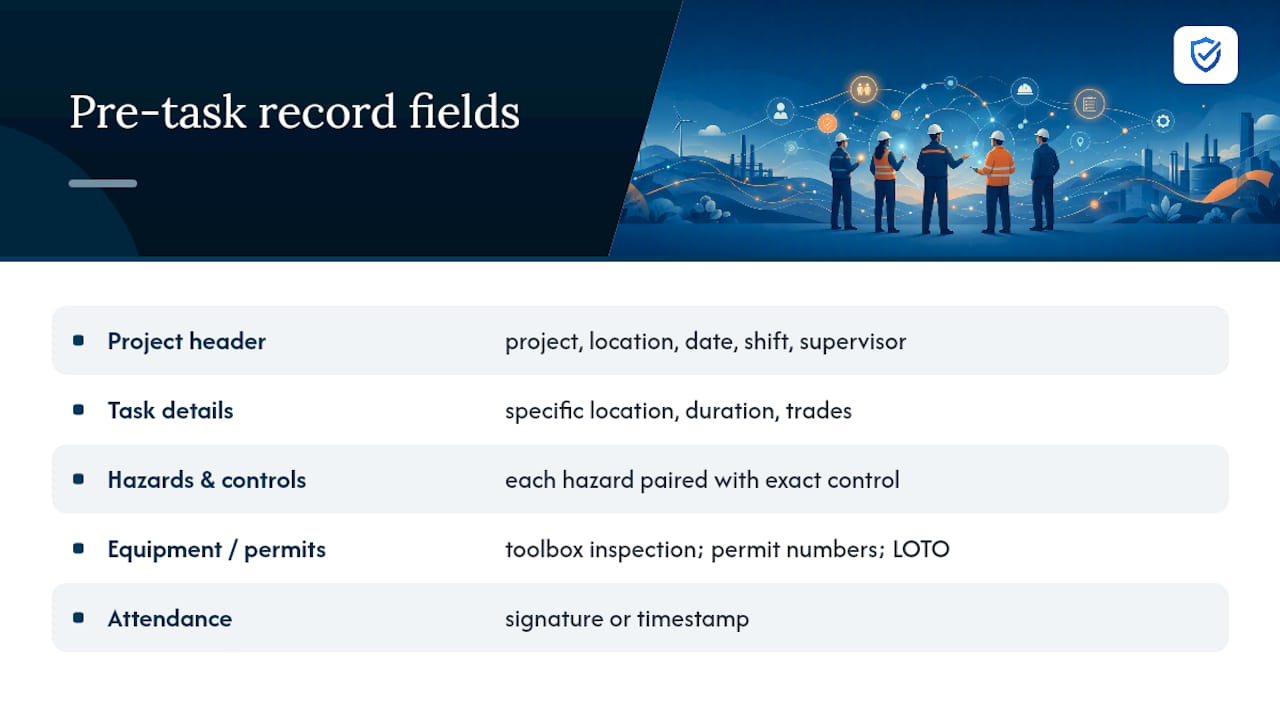
Task lines need to be specific, not generic. “Formwork on level 3, north wing, approximately two hours, carpentry and labor trades” tells an inspector something. “Concrete work” does not.
Hazard identification is where most records fall apart. Each hazard needs a matched control, not a vague acknowledgment. Write “fall hazard at unguarded edge, controlled by guardrail installation and 100% tie-off” rather than “fall hazard, use caution.” That hazard-to-control link is exactly what large-project safety programs recommend documenting at the crew level every morning, and it’s the same logic behind hazard communication fundamentals more broadly.

Equipment and permit fields capture toolbox inspection status, confined-space or hot-work permit numbers, and lockout/tagout confirmation. If a permit hasn’t been issued yet, note that and flag it rather than leaving the field blank.
Attendance works best as signature, printed name, and time signed, side by side. Digital timestamps are an acceptable substitute and often more defensible, since they can’t be backdated after the fact.

Pro Tip: Write hazard entries the way you’d explain them to a new hire: specific enough that someone unfamiliar with the site could picture the risk and the fix in one sentence.
How Do You Run a Pre-Task Meeting Without Wasting Time?
A pre-task meeting should run 3 to 10 minutes depending on task complexity. Anything longer starts eating into productive work time, and crews tune out.
- Set the cadence. Hold the meeting just before work starts, every shift, not just Mondays.
- Assign the leader. The trade supervisor or foreman runs the crew-level briefing. This sits below project-wide safety updates and above individual task hazard analysis in the three-tier briefing structure larger projects use to avoid repeating the same content at every level.
- Stay focused. Cover only what changed since yesterday: new hazards, new permits, new crew members. Skip re-explaining general policy already covered in a weekly toolbox talk.
- Watch for pitfalls. Vague hazard language, missing signatures, open action items with no owner, and inconsistent filenames are the most common defects.
Pro Tip: Keep a one-page pre-meeting checklist in your back pocket. If nothing changed from yesterday’s task, say so and move on. That’s what keeps a five-minute briefing from becoming fifteen.
What Do Regulators Expect From Meeting Records?
Inspectors treat daily meeting logs as leading indicators, meaning they show proactive safety activity rather than reactive damage control after an incident. OSHA’s leading indicators guidance frames documented safety meetings alongside near-miss reporting as evidence a program is actually functioning, not just existing on paper.
In New York City, Building Code section 3301.12 requires permit holders to maintain a record for each worker of pre-shift safety meetings, including the date and the specific content covered. That’s a concrete, checkable requirement, not a suggestion, and it applies regardless of how informal the meeting felt on-site.
Retention practices vary by jurisdiction, so confirm local requirements, but many safety programs keep daily logs accessible for quick reference short-term and archived for a longer audit window.
Storage should follow a consistent folder structure and filename convention, with backups and access controls limiting who can view signature data, since names and signatures carry privacy weight beyond the safety content itself.
Running the Meeting Step by Step On-Site
- Gather the crew and confirm presence. Fill in header metadata and note the exact start time.
- State the day’s tasks clearly. Write them into the task lines as you announce them, not after the fact.
- Scan hazards by task. Walk through each task, name the hazard, assign a control.
- Check permits and equipment. Confirm inspections are current, or flag anything pending for follow-up.
- Collect signatures. Capture attendance with a timestamp for each name, and assign an owner to any open action item.
Pro Tip: Close with a thirty-second verbal recap and log the end time on the same record. That two-line addition alone resolves a surprising number of audit questions about meeting duration.
What Does a Completed Record Look Like?
A real entry stays short but specific:
- Header: March 12, 2026, 6:45 AM, Level 3 North Wing, Foreman J. Ramirez
- Task: Formwork installation, carpentry crew, approximately 2 hours
- Hazards and controls: Fall hazard at unguarded edge, controlled with guardrails and 100% tie-off; struck-by hazard from crane lift, controlled with exclusion zone and signal person
- Permit note: Crane lift permit #4471, verified active
- Attendance: 6 crew members signed, timestamps 6:52 to 6:58 AM
An inspector reads the hazard-control pairing and the permit reference first. For higher-risk tasks, attach a photo of the guardrail installation or the permit itself directly to the digital record as supporting evidence.
What Deficiencies Do Auditors Flag Most Often?
Missing signatures or timestamps top the list, followed by vague hazard descriptions that don’t name an actual control. Blank action-owner fields, inconsistent storage locations, and missing permit references round out the common five.
- Missing signature: get supervisor initials on a backdated corrective note, attached to the original record
- Vague hazard: rewrite with the specific control method named
- No action owner: assign one immediately and set a due date
- Inconsistent storage: migrate to one searchable location going forward
Pro Tip: Run a weekly spot-check on five random daily records. Whatever you find wrong on your own schedule, a regulator finds on theirs, at a worse time.
A note on making these records actually work
The records that survive an audit aren’t the longest ones. They’re the ones where every hazard has a named control and every signature has a timestamp. Templates fail when supervisors treat them as paperwork instead of the actual safety conversation, written down.
How Automation Simplifies Compliant Daily Records
My Safety Solution is the alternative to loose paper forms and scattered spreadsheets for daily pre-task documentation. Every field from the template above gets enforced automatically, attendance gets timestamped the moment a worker signs on a phone, and photos attach directly to the record instead of living in someone’s camera roll.

That structure solves the exact pitfalls covered earlier: missing timestamps, inconsistent filenames, and paper forms that get lost between the trailer and the site office. Records save to a searchable, centralized system with compliance reporting built in, so an audit request that used to take an afternoon takes minutes. Explore My Safety Solution’s construction safety software to see the template and attendance features in action, or visit the main product page to start a trial and see how your next pre-task meeting gets documented before the crew even leaves the huddle.
Sources
- UpCodes: pre-shift safety meetings
- Sundt: Project Safety Management Plan
- HubSpot: Free Meeting Agenda Template